# eXDevice+ 공통

eXDevice+ 기본 API

# 서비스 및 통신 프로토콜

 eXDevice+는 WebSocket을 통해 브라우저(WebSocket Client)들과 통신을 수행합니다.

 브라우저는 eXDevice+에 WebSocket 메시지를 전송해 eXDevice+가 제공하는 서비스들을 호출할 수 있으며, 요청/응답 프로토콜은 사전 정의된 JSON 프로토콜을 따릅니다.

### 1. 서비스 정의

 eXDevice+ 에서 정의하는 서비스란 브라우저 제약 사항으로 인해 브라우저에서 수행할 수 없는 기능들을 의미합니다.

 본 가이드 문서에서 제공하는 서비스들은 Installer를 통해 eXDevice+를 PC에 설치하는 경우 기본적으로 사용할 수 있는 서비스들에 대해 작성되어 있습니다.

[![image.png](https://bookstack.tomatosystem.co.kr/uploads/images/gallery/2025-11/scaled-1680-/78Timage.png)](https://bookstack.tomatosystem.co.kr/uploads/images/gallery/2025-11/78Timage.png)

**&lt;eXDevice+ 서비스 호출 과정&gt;**

### 2. eXDevice+ 요청 프로토콜

 WebSocket Client가 eXDevice+의 특정 서비스를 호출하기 위한 포맷입니다.

```json
{
  "service":"호출할 서비스 명칭",
  "requestKey":"어떤 서비스에 대한 응답인지 식별할 Key값",
  "param":{
    "파라미터 명칭":"파라미터 값",
    ...
  }
}
```

- service 
    - 호출하고자 하는 서비스 이름입니다.
    - 가이드 문서에 명시된 서비스 이름을 사용합니다.
- requestKey 
    - WebSocket Client에서 발급하는 랜덤한 키 값입니다.
    - WebSocket 통신 특성 상 비동기적으로 eXDevice+에게 메시지를 송수신 하므로, 응답 수신 시 어떤 요청에 대한 응답인지 식별하기 위한 값입니다.
    - requestKey는 서비스 호출에 대한 응답을 수신할 때 까지 WebSocket Client에서 관리 되어야 합니다.
- param 
    - 서비스를 호출하기 위해 요구되는 파라미터 정보입니다.
    - 가이드 문서에 명시된 각각의 서비스에서 요구하는 파라미터를 입력해야합니다.

### 3. eXDevice+ 응답 프로토콜

 WebSocket Client가 eXDevice+에게 요청한 서비스의 응답을 수신하기 위한 포맷입니다.

```json
{
  "service":"WebSocket Client가 요청한 서비스 명칭",
  "requestKey":"WebSocket Client가 송신한 Key값",
  "statusCode":"eXDevice+ 상태 코드"
  "return":"서비스 호출 결과 값"
}
```

- service 
    - WebSocket Client가 호출한 서비스 명칭입니다.
    - requestKey와 조합해 어떤 호출에 대한 응답인지 식별할 수 있습니다.
- requestKey 
    - WebSocket Client가 서비스를 호출하기 위해 발급한 랜덤한 키 값입니다.
    - service와 조합해 어떤 호출에 대한 응답인지 식별할 수 있습니다.
- statusCode 
    - 서비스 호출에 대한 eXDevice+ 상태 코드입니다.
    - "0000"이 리턴 된 경우 정상적으로 서비스를 호출했음을 의미하며, 그 외의 값은 서비스 호출 전 일련의 이유로 서비스를 호출하지 못했음을 의미합니다.
- return 
    - 서비스를 호출한 결과 입니다.
    - int, string, double, Array, JSON 등 다양한 값이 리턴 될 수 있습니다.
    - 각 서비스에 대한 호출 결과는 가이드 문서에 명시된 서비스들을 참고하시길 바랍니다.

### 4. eXDevice+ 상태 코드

 eXDevice+ 상태 코드는 기본적으로 "0000"이 리턴되는 경우 정상적으로 서비스를 호출한 상태입니다. 즉, "0000"을 제외한 상태 코드는 eXDevice+가 서비스를 호출하지 못한 이유에 대한 코드입니다.

##### 4.1. 1000번대

 1000번대 상태 코드는 일반적으로 WebSocket Client가 전송한 요청 메시지에 의해 발생합니다. 해당 상태 코드가 출력되는 경우 WebSocket Client에서 송신하는 요청 메시지와 가이드 문서의 서비스를 확인하시길 바랍니다.

- WebSocket Client 요청 메시지 검증
- WebSocket Client 요청 서비스 데이터 타입 변환 실패
- 잘못된 WebSocket Client 요청

<table border="1" id="bkmrk-%EC%83%81%ED%83%9C%EC%BD%94%EB%93%9C-%EB%B6%84%EB%A5%98-%EC%83%81%ED%83%9C%EC%BD%94%EB%93%9C-%EC%83%81%EC%84%B8-%EB%B9%84%EA%B3%A0-1" style="border-collapse: collapse; width: 100%; height: 297.969px;"><colgroup><col style="width: 8.46246%;"></col><col style="width: 25.0325%;"></col><col style="width: 41.4753%;"></col><col style="width: 25.0298%;"></col></colgroup><thead><tr style="height: 29.7969px;"><td class="align-center" style="height: 29.7969px;">**상태코드**</td><td class="align-center" style="height: 29.7969px;">**분류**</td><td class="align-center" style="height: 29.7969px;">**상태코드 상세**</td><td class="align-center" style="height: 29.7969px;">**비고**</td></tr></thead><tbody><tr style="height: 29.7969px;"><td class="align-center" style="height: 29.7969px;">1000</td><td style="height: 29.7969px;">정의되지 않은 통신 예외</td><td style="height: 29.7969px;">-</td><td style="height: 29.7969px;">Log 파일 확인</td></tr><tr style="height: 29.7969px;"><td class="align-center" style="height: 29.7969px;">1001</td><td style="height: 29.7969px;">JSON 포맷이 아닌 요청</td><td style="height: 29.7969px;">요청 메시지가 JSON 포맷이 아님</td><td style="height: 29.7969px;">-</td></tr><tr style="height: 29.7969px;"><td class="align-center" style="height: 29.7969px;">1002</td><td style="height: 29.7969px;">요청 프로토콜 불일치</td><td style="height: 29.7969px;">요청 프로토콜과 일치 하지 않는 JSON 포맷</td><td style="height: 29.7969px;">-</td></tr><tr style="height: 29.7969px;"><td class="align-center" style="height: 29.7969px;">1003</td><td style="height: 29.7969px;">필수 정보 누락</td><td style="height: 29.7969px;">Service 호출에 필요한 필수 정보 누락</td><td style="height: 29.7969px;">-</td></tr><tr style="height: 29.7969px;"><td class="align-center" style="height: 29.7969px;">1004</td><td style="height: 29.7969px;">지원하는 서비스 없음</td><td style="height: 29.7969px;">서비스 설정 파일(module.json)에 기재된 서비스 없음</td><td style="height: 29.7969px;">-</td></tr><tr style="height: 29.7969px;"><td class="align-center" style="height: 29.7969px;">1005</td><td style="height: 29.7969px;">지원하지 않는 서비스</td><td style="height: 29.7969px;">지원하지 않는 서비스 요청</td><td style="height: 29.7969px;">-</td></tr><tr style="height: 29.7969px;"><td class="align-center" style="height: 29.7969px;">1006</td><td style="height: 29.7969px;">파라미터 불일치</td><td style="height: 29.7969px;">요청 메시지 파라미터가 서비스 호출 파라미터와 불일치</td><td style="height: 29.7969px;">-</td></tr><tr style="height: 29.7969px;"><td class="align-center" style="height: 29.7969px;">1007</td><td style="height: 29.7969px;">파라미터 타입 변환 실패</td><td style="height: 29.7969px;">파라미터 데이터 타입 불일치</td><td style="height: 29.7969px;">-</td></tr><tr style="height: 29.7969px;"><td class="align-center" style="height: 29.7969px;">1008</td><td style="height: 29.7969px;">serviceId 누락</td><td style="height: 29.7969px;">요청 메시지에 serviceId 정보 누락</td><td style="height: 29.7969px;">-</td></tr></tbody></table>

##### 4.2. 2000번대

 2000번대 상태 코드는 일반적으로 서비스 식별 및 생성 단계에서 발생합니다. 해당 상태 코드가 반복적으로 출력되는 경우 서비스 설정 파일(modules.json)을 확인하거나, 기술지원을 받으시길 바랍니다.

- 서비스 DLL/ActiveX 로드 실패
- 서비스 설정 파일 에러
- 서비스 객체 생성 실패

<table border="1" id="bkmrk-%EC%83%81%ED%83%9C%EC%BD%94%EB%93%9C-%EB%B6%84%EB%A5%98-%EC%83%81%ED%83%9C%EC%BD%94%EB%93%9C-%EC%83%81%EC%84%B8-%EB%B9%84%EA%B3%A0-2" style="border-collapse: collapse; width: 100%; height: 446.953px;"><colgroup><col style="width: 8.46246%;"></col><col style="width: 26.3409%;"></col><col style="width: 41.7145%;"></col><col style="width: 23.4822%;"></col></colgroup><thead><tr style="height: 29.7969px;"><td class="align-center" style="height: 29.7969px;">**상태코드**</td><td class="align-center" style="height: 29.7969px;">**분류**</td><td class="align-center" style="height: 29.7969px;">**상태코드 상세**</td><td class="align-center" style="height: 29.7969px;">**비고**</td></tr></thead><tbody><tr style="height: 29.7969px;"><td class="align-center" style="height: 29.7969px;">2000</td><td style="height: 29.7969px;">정의되지 않은 서비스 예외</td><td style="height: 29.7969px;">-</td><td style="height: 29.7969px;">Log 파일 확인</td></tr><tr style="height: 29.7969px;"><td class="align-center" style="height: 29.7969px;">2001</td><td style="height: 29.7969px;">libType 정보 누락</td><td style="height: 29.7969px;">설정 파일에 정보 누락</td><td style="height: 29.7969px;">modules.json 확인</td></tr><tr style="height: 29.7969px;"><td class="align-center" style="height: 29.7969px;">2002</td><td style="height: 29.7969px;">지원하지 않는 libType</td><td style="height: 29.7969px;">설정 파일에 유효하지 않은 정보 기재되어 있음</td><td style="height: 29.7969px;">modules.json 확인</td></tr><tr style="height: 29.7969px;"><td class="align-center" style="height: 29.7969px;">2003</td><td style="height: 29.7969px;">libFile 정보 누락</td><td style="height: 29.7969px;">설정 파일에 정보 누락  
</td><td style="height: 29.7969px;">modules.json 확인</td></tr><tr style="height: 29.7969px;"><td class="align-center" style="height: 29.7969px;">2004</td><td style="height: 29.7969px;">delegator 정보 누락</td><td style="height: 29.7969px;">설정 파일에 정보 누락  
</td><td style="height: 29.7969px;">modules.json 확인</td></tr><tr style="height: 29.7969px;"><td class="align-center" style="height: 29.7969px;">2005</td><td style="height: 29.7969px;">지원하지 않는 delegator</td><td style="height: 29.7969px;">설정 파일에 유효하지 않은 정보 기재되어 있음</td><td style="height: 29.7969px;">modules.json 확인</td></tr><tr style="height: 29.7969px;"><td class="align-center" style="height: 29.7969px;">2006</td><td style="height: 29.7969px;">destDir 정보 누락</td><td style="height: 29.7969px;">설정 파일에 정보 누락</td><td style="height: 29.7969px;">modules.json 확인</td></tr><tr style="height: 29.7969px;"><td class="align-center" style="height: 29.7969px;">2007</td><td style="height: 29.7969px;">CLSID 정보 누락</td><td style="height: 29.7969px;">설정 파일에 정보 누락</td><td style="height: 29.7969px;">modules.json 확인</td></tr><tr style="height: 29.7969px;"><td class="align-center" style="height: 29.7969px;">2008</td><td style="height: 29.7969px;">지원하지 않는 param 타입</td><td style="height: 29.7969px;">설정 파일에 유효하지 않은 정보 기재되어 있음</td><td style="height: 29.7969px;">modules.json 확인</td></tr><tr style="height: 29.7969px;"><td class="align-center" style="height: 29.7969px;">2009</td><td style="height: 29.7969px;">지원하지 않는 return 타입</td><td style="height: 29.7969px;">설정 파일에 유효하지 않은 정보 기재되어 있음</td><td style="height: 29.7969px;">modules.json 확인</td></tr><tr style="height: 29.7969px;"><td class="align-center" style="height: 29.7969px;">2010</td><td style="height: 29.7969px;">지원하지 않는 returnObject 타입</td><td style="height: 29.7969px;">설정 파일에 유효하지 않은 정보 기재되어 있음</td><td style="height: 29.7969px;">modules.json 확인</td></tr><tr style="height: 29.7969px;"><td class="align-center" style="height: 29.7969px;">2011</td><td style="height: 29.7969px;">delegator 생성 실패</td><td style="height: 29.7969px;">객체 생성 실패</td><td style="height: 29.7969px;">Log 파일 확인</td></tr><tr style="height: 29.7969px;"><td class="align-center" style="height: 29.7969px;">2012</td><td style="height: 29.7969px;">subForm 생성 실패</td><td style="height: 29.7969px;">객체 생성 실패</td><td style="height: 29.7969px;">Log 파일 확인</td></tr><tr style="height: 29.7969px;"><td class="align-center" style="height: 29.7969px;">2013</td><td style="height: 29.7969px;">libType 오용</td><td style="height: 29.7969px;">serviceId를 발급 받을 수 없는 서비스에 serviceId 사용</td><td style="height: 29.7969px;">modules.json 확인</td></tr></tbody></table>

##### 4.3. 3000번대

 3000번대 상태 코드는 일반적으로 서비스 호출 단계에서 발생합니다.

<table border="1" id="bkmrk-%EC%83%81%ED%83%9C%EC%BD%94%EB%93%9C-%EB%B6%84%EB%A5%98-%EC%83%81%ED%83%9C%EC%BD%94%EB%93%9C-%EC%83%81%EC%84%B8-%EB%B9%84%EA%B3%A0-3" style="border-collapse: collapse; width: 100%; height: 804.516px;"><colgroup><col style="width: 8.46246%;"></col><col style="width: 28.3671%;"></col><col style="width: 41.2377%;"></col><col style="width: 21.9327%;"></col></colgroup><thead><tr style="height: 29.7969px;"><td class="align-center" style="height: 29.7969px;">**상태코드**</td><td class="align-center" style="height: 29.7969px;">**분류**</td><td class="align-center" style="height: 29.7969px;">**상태코드 상세**</td><td class="align-center" style="height: 29.7969px;">**비고**</td></tr></thead><tbody><tr style="height: 29.7969px;"><td class="align-center" style="height: 29.7969px;">3000</td><td style="height: 29.7969px;">정의되지 않은 서비스 호출 예외</td><td style="height: 29.7969px;">-</td><td style="height: 29.7969px;">Log 파일 확인</td></tr><tr style="height: 29.7969px;"><td class="align-center" style="height: 29.7969px;">3001</td><td style="height: 29.7969px;">파일 누락</td><td style="height: 29.7969px;">대상 서비스 파일이 로컬에 존재하지 않음</td><td style="height: 29.7969px;">-</td></tr><tr style="height: 29.7969px;"><td class="align-center" style="height: 29.7969px;">3002</td><td style="height: 29.7969px;">레지스트리 등록 누락</td><td style="height: 29.7969px;">대상 서비스 파일이 레지스트리에 등록되지 않음</td><td style="height: 29.7969px;">-</td></tr><tr style="height: 29.7969px;"><td class="align-center" style="height: 29.7969px;">3003</td><td style="height: 29.7969px;">라이브러리 식별 실패</td><td style="height: 29.7969px;">native Dll/managed Dll 식별 실패</td><td style="height: 29.7969px;">-</td></tr><tr style="height: 29.7969px;"><td class="align-center" style="height: 29.7969px;">3004</td><td style="height: 29.7969px;">라이브러리 로드 실패</td><td style="height: 29.7969px;">라이브러리 메모리 로드 실패</td><td style="height: 29.7969px;">-</td></tr><tr style="height: 29.7969px;"><td class="align-center" style="height: 29.7969px;">3005</td><td style="height: 29.7969px;">지원하지 않는 라이브러리</td><td style="height: 29.7969px;">eXDevice+에서 지원하지 않는 라이브러리 확장자 로드</td><td style="height: 29.7969px;">-</td></tr><tr style="height: 29.7969px;"><td class="align-center" style="height: 29.7969px;">3006</td><td style="height: 29.7969px;">export된 class 없음</td><td style="height: 29.7969px;">라이브러리에서 export된 class 없음</td><td style="height: 29.7969px;">-</td></tr><tr style="height: 29.7969px;"><td class="align-center" style="height: 29.7969px;">3007</td><td style="height: 29.7969px;">대상 class 찾을 수 없음</td><td style="height: 29.7969px;">라이브러리에서 대상 class 찾을 수 없음</td><td style="height: 29.7969px;">-</td></tr><tr style="height: 29.7969px;"><td class="align-center" style="height: 29.7969px;">3008</td><td style="height: 29.7969px;">export된 method 없음</td><td style="height: 29.7969px;">class에서 export 된 method 없음</td><td style="height: 29.7969px;">-</td></tr><tr style="height: 29.7969px;"><td class="align-center" style="height: 29.7969px;">3009</td><td style="height: 29.7969px;">대상 method 찾을 수 없음</td><td style="height: 29.7969px;">class에서 대상 method 찾을 수 없음</td><td style="height: 29.7969px;">-</td></tr><tr style="height: 29.7969px;"><td class="align-center" style="height: 29.7969px;">3010</td><td style="height: 29.7969px;">참조 타입 변환 실패</td><td style="height: 29.7969px;">ref 데이터 타입 변환 실패</td><td style="height: 29.7969px;">-</td></tr><tr style="height: 29.7969px;"><td class="align-center" style="height: 29.7969px;">3011</td><td style="height: 29.7969px;">Method IL 생성 실패</td><td style="height: 29.7969px;">Method IL 생성 실패</td><td style="height: 29.7969px;">-</td></tr><tr style="height: 29.7969px;"><td class="align-center" style="height: 29.7969px;">3012</td><td style="height: 29.7969px;">ActiveX 컨트롤 생성 실패</td><td style="height: 29.7969px;">요청한 서비스를 제공할 ActiveX 컨트롤 생성 실패</td><td style="height: 29.7969px;">-</td></tr><tr style="height: 29.7969px;"><td class="align-center" style="height: 29.7969px;">3013</td><td style="height: 29.7969px;">ActiveX 컨트롤 생성되지 않음</td><td style="height: 29.7969px;">요청한 서비스를 제공하는 ActiveX 컨트롤 생성되지 않음</td><td style="height: 29.7969px;">-</td></tr><tr style="height: 29.7969px;"><td class="align-center" style="height: 29.7969px;">3014</td><td style="height: 29.7969px;">참조 데이터 획득 실패</td><td style="height: 29.7969px;">ref/out 타입의 데이터 값 획득 실패</td><td style="height: 29.7969px;">-</td></tr><tr style="height: 29.7969px;"><td class="align-center" style="height: 29.7969px;">3015</td><td style="height: 29.7969px;">호출 결과 값 타입 변환 실패</td><td style="height: 29.7969px;">Invoke 결과 값 데이터 타입 변환 실패</td><td style="height: 29.7969px;">-</td></tr><tr style="height: 29.7969px;"><td class="align-center" style="height: 29.7969px;">3016</td><td style="height: 29.7969px;">결과 값 Dictionary 변환 실패</td><td style="height: 29.7969px;">Invoke 결과 값 Dictionary&lt;string, T&gt; 변환 실패</td><td style="height: 29.7969px;">-</td></tr><tr style="height: 29.7969px;"><td class="align-center" style="height: 29.7969px;">3017</td><td style="height: 29.7969px;">Client 연결 해제됨</td><td style="height: 29.7969px;">서비스 객체를 소유한 Client의 WebSocket 연결 해제</td><td style="height: 29.7969px;">stateful 서비스</td></tr><tr style="height: 29.7969px;"><td class="align-center" style="height: 29.7969px;">3018</td><td style="height: 29.7969px;">서비스 객체 검색 실패</td><td style="height: 29.7969px;">대상 Client가 보유한 서비스 객체 검색 실패</td><td style="height: 29.7969px;">stateful 서비스</td></tr><tr style="height: 29.7969px;"><td class="align-center" style="height: 29.7969px;">3019</td><td style="height: 29.7969px;">서비스 객체 추가 실패</td><td style="height: 29.7969px;">대상 Client가 보유한 서비스 객체로 추가 실패</td><td style="height: 29.7969px;">stateful 서비스</td></tr><tr style="height: 29.7969px;"><td class="align-center" style="height: 29.7969px;">3020</td><td style="height: 29.7969px;">등록되지 않은 serviceId 요청</td><td style="height: 29.7969px;">등록되지 않은 serviceId가 요청 됨</td><td style="height: 29.7969px;">stateful 서비스</td></tr><tr style="height: 29.7969px;"><td class="align-center" style="height: 29.7969px;">3021</td><td style="height: 29.7969px;">추상 서비스 객체 검색 실패</td><td style="height: 29.7969px;">대상 Client가 보유한 추상 서비스 객체 검색 실패</td><td style="height: 29.7969px;">stateful 서비스</td></tr><tr style="height: 29.7969px;"><td class="align-center" style="height: 29.7969px;">3022</td><td style="height: 29.7969px;">추상 서비스 객체 추가 실패</td><td style="height: 29.7969px;">대상 Client가 보유한 추상 서비스 객체 추가 실패</td><td style="height: 29.7969px;">stateful 서비스</td></tr><tr style="height: 29.7969px;"><td class="align-center" style="height: 29.7969px;">3023</td><td style="height: 29.7969px;">추상 서비스 객체 제거 실패</td><td style="height: 29.7969px;">대상 Client가 보유한 추상 서비스 객체 제거 실패</td><td style="height: 29.7969px;">stateful 서비스</td></tr><tr style="height: 29.7969px;"><td class="align-center" style="height: 29.7969px;">3024</td><td style="height: 29.7969px;">Client의 소유 서비스 제거 실패</td><td style="height: 29.7969px;">대상 Client가 보유한 서비스 객체 제거 실패</td><td style="height: 29.7969px;">stateful 서비스</td></tr><tr style="height: 29.7969px;"><td class="align-center" style="height: 29.7969px;">3025</td><td style="height: 29.7969px;">serviceId 이미 등록됨</td><td style="height: 29.7969px;">대상 serviceId가 이미 등록되어 있음</td><td style="height: 29.7969px;">stateful 서비스</td></tr></tbody></table>

##### 4.4. 4000번대

 4000번 상태 코드는 eXDevice+에서 발생한 예외가 아닌, eXDevice+가 호출한 서비스를 보유한 DLL에서 발생한 예외입니다. 즉, eXDevice+가 서비스를 호출하기 직전까지는 예외가 발생하지 않았음(1000, 2000, 3000 해당 없음)을 의미합니다.

 4000번이 발생한 경우, 호출한 서비스에서 제공하는 상태 코드를 확인하시길 바랍니다.

# 제공 서비스 리스트

 eXDevice+는 다음과 같은 서비스를 제공합니다.

<p class="callout warning">기능 기준: agent, syssvc.dll 버전</p>

<table border="1" id="bkmrk-no.-%EC%84%9C%EB%B9%84%EC%8A%A4-%EA%B7%B8%EB%A3%B9-%EC%84%9C%EB%B9%84%EC%8A%A4%EB%AA%85-api%EB%AA%85" style="border-collapse: collapse; width: 100%; height: 1760.2px;"><colgroup><col style="width: 17.9976%;"></col><col style="width: 22.7652%;"></col><col style="width: 34.6841%;"></col><col style="width: 12.5149%;"></col><col style="width: 11.919%;"></col></colgroup><thead><tr style="height: 29.7969px;"><td class="align-center" style="height: 29.7969px;">**서비스 그룹**</td><td class="align-center" style="height: 29.7969px;">**서비스명**</td><td class="align-center" style="height: 29.7969px;">**API명**</td><td class="align-center" style="height: 29.7969px;">**agent 버전**</td><td class="align-center" style="height: 29.7969px;">**syssvc 버전**</td></tr></thead><tbody><tr style="height: 29.7969px;"><td style="height: 29.7969px;">eXDevice+ 정보 획득</td><td style="height: 29.7969px;">제품 버전 확인</td><td style="height: 29.7969px;">eXDeviceInfo</td><td class="align-center" style="height: 29.7969px;">1.0.3 &gt;=</td><td class="align-center" style="height: 29.7969px;">-</td></tr><tr style="height: 29.7969px;"><td rowspan="7" style="height: 208.578px;">WebSocket client간 Websocket 통신

</td><td style="height: 29.7969px;">Client 등록 및 수정</td><td style="height: 29.7969px;">UpdateWsInfo</td><td class="align-center" style="height: 29.7969px;">1.0.3 &gt;=</td><td class="align-center" style="height: 29.7969px;">-</td></tr><tr style="height: 29.7969px;"><td style="height: 29.7969px;">Client 리스트 획득</td><td style="height: 29.7969px;">GetWsClients</td><td class="align-center" style="height: 29.7969px;">1.0.3 &gt;=</td><td class="align-center" style="height: 29.7969px;">-</td></tr><tr style="height: 29.7969px;"><td style="height: 29.7969px;">자신의 식별 정보 조회</td><td style="height: 29.7969px;">GetWsOwnInfo</td><td class="align-center" style="height: 29.7969px;">1.0.3 &gt;=</td><td class="align-center" style="height: 29.7969px;">-</td></tr><tr style="height: 29.7969px;"><td style="height: 29.7969px;">push</td><td style="height: 29.7969px;">PushWsMessage</td><td class="align-center" style="height: 29.7969px;">1.0.3 &gt;=</td><td class="align-center" style="height: 29.7969px;">-</td></tr><tr style="height: 29.7969px;"><td style="height: 29.7969px;">broadcast</td><td style="height: 29.7969px;">BroadcastWsMessage</td><td class="align-center" style="height: 29.7969px;">1.0.3 &gt;=</td><td class="align-center" style="height: 29.7969px;">-</td></tr><tr style="height: 29.7969px;"><td style="height: 29.7969px;">push 수신</td><td style="height: 29.7969px;">ReceiveWsPush</td><td class="align-center" style="height: 29.7969px;">1.0.3 &gt;=</td><td class="align-center" style="height: 29.7969px;">-</td></tr><tr style="height: 29.7969px;"><td style="height: 29.7969px;">broadcast 수신</td><td style="height: 29.7969px;">ReceiveWsBroadcast</td><td class="align-center" style="height: 29.7969px;">1.0.3 &gt;=</td><td class="align-center" style="height: 29.7969px;">-</td></tr><tr style="height: 29.7969px;"><td rowspan="6" style="height: 178.781px;">원격 eXDevice+간 TCP Socket 통신

</td><td style="height: 29.7969px;">Socket 서버 open</td><td style="height: 29.7969px;">OpenTcpServer</td><td class="align-center" style="height: 29.7969px;">1.0.3 &gt;=</td><td class="align-center" style="height: 29.7969px;">-</td></tr><tr style="height: 29.7969px;"><td style="height: 29.7969px;">Socket 서버 close</td><td style="height: 29.7969px;">CloseTcpServer</td><td class="align-center" style="height: 29.7969px;">1.0.3 &gt;=</td><td class="align-center" style="height: 29.7969px;">-</td></tr><tr style="height: 29.7969px;"><td style="height: 29.7969px;">Socket 서버 정보 획득</td><td style="height: 29.7969px;">GetTcpServerInfo</td><td class="align-center" style="height: 29.7969px;">1.0.3 &gt;=</td><td class="align-center" style="height: 29.7969px;">-</td></tr><tr style="height: 29.7969px;"><td style="height: 29.7969px;">endpoint 리스트 획득</td><td style="height: 29.7969px;">GetTcpEndpoints</td><td class="align-center" style="height: 29.7969px;">1.0.3 &gt;=</td><td class="align-center" style="height: 29.7969px;">-</td></tr><tr style="height: 29.7969px;"><td style="height: 29.7969px;">TCP 메시지 송신</td><td style="height: 29.7969px;">SendTcpMessage</td><td class="align-center" style="height: 29.7969px;">1.0.3 &gt;=</td><td class="align-center" style="height: 29.7969px;">-</td></tr><tr style="height: 29.7969px;"><td style="height: 29.7969px;">TCP 메시지 수신</td><td style="height: 29.7969px;">ReceiveTcpMessage</td><td class="align-center" style="height: 29.7969px;">1.0.3 &gt;=</td><td class="align-center" style="height: 29.7969px;">-</td></tr><tr style="height: 29.7969px;"><td rowspan="2" style="height: 59.5938px;">Network 관련  
</td><td style="height: 29.7969px;">로컬 IPv4 주소 획득</td><td style="height: 29.7969px;">WinInfo.GetIpAddress</td><td class="align-center" style="height: 29.7969px;">-</td><td class="align-center" style="height: 29.7969px;">1.0.3.7 &gt;=</td></tr><tr style="height: 29.7969px;"><td style="height: 29.7969px;">로컬 MAC 주소 획득</td><td style="height: 29.7969px;">WinInfo.GetMacAddress</td><td class="align-center" style="height: 29.7969px;">-</td><td class="align-center" style="height: 29.7969px;">1.0.3.7 &gt;=</td></tr><tr style="height: 29.7969px;"><td rowspan="6" style="height: 178.781px;">모니터 관련  
</td><td style="height: 29.7969px;">연결된 모니터 개수 획득</td><td style="height: 29.7969px;">WinInfo.GetConnectedScreenNumber</td><td class="align-center" style="height: 29.7969px;">-</td><td class="align-center" style="height: 29.7969px;">1.0.3.7 &gt;=</td></tr><tr style="height: 29.7969px;"><td style="height: 29.7969px;">주 모니터 식별</td><td style="height: 29.7969px;">WinInfo.PrimaryScreen</td><td class="align-center" style="height: 29.7969px;">-</td><td class="align-center" style="height: 29.7969px;">1.0.3.7 &gt;=</td></tr><tr style="height: 29.7969px;"><td style="height: 29.7969px;">전체 모니터 식별</td><td style="height: 29.7969px;">WinInfo.GetAllScreens</td><td class="align-center" style="height: 29.7969px;">-</td><td class="align-center" style="height: 29.7969px;">1.0.3.7 &gt;=</td></tr><tr style="height: 29.7969px;"><td style="height: 29.7969px;">주 모니터 해상도 획득</td><td style="height: 29.7969px;">WinInfo.GetPrimaryResolution</td><td class="align-center" style="height: 29.7969px;">-</td><td class="align-center" style="height: 29.7969px;">1.0.3.7 &gt;=</td></tr><tr style="height: 29.7969px;"><td style="height: 29.7969px;">지정 모니터 해상도 획득</td><td style="height: 29.7969px;">WinInfo.GetSpecialScreenResolution</td><td class="align-center" style="height: 29.7969px;">-</td><td class="align-center" style="height: 29.7969px;">1.0.3.7 &gt;=</td></tr><tr style="height: 29.7969px;"><td style="height: 29.7969px;">전체 모니터 해상도 획득</td><td style="height: 29.7969px;">WinInfo.GetAllScreenResolutions</td><td class="align-center" style="height: 29.7969px;">-</td><td class="align-center" style="height: 29.7969px;">1.0.3.7 &gt;=</td></tr><tr style="height: 46.5938px;"><td rowspan="7" style="height: 292.563px;">프로세스 제어 관련  
</td><td style="height: 46.5938px;">타이틀 기반   
프로세스 구동 체크</td><td style="height: 46.5938px;">WinInfo.CheckProcessRunningByTitle</td><td class="align-center" style="height: 46.5938px;">-</td><td class="align-center" style="height: 46.5938px;">1.0.3.7 &gt;=</td></tr><tr style="height: 46.5938px;"><td style="height: 46.5938px;">PID 기반  
프로세스 구동 체크</td><td style="height: 46.5938px;">Wininfo.CheckProcessRunningByPID</td><td class="align-center" style="height: 46.5938px;">-</td><td class="align-center" style="height: 46.5938px;">1.0.3.7 &gt;=</td></tr><tr style="height: 46.5938px;"><td style="height: 46.5938px;">타이틀 기반   
특정 프로세스 창 이동</td><td style="height: 46.5938px;">WinInfo.SetWindowPosition</td><td class="align-center" style="height: 46.5938px;">-</td><td class="align-center" style="height: 46.5938px;">1.0.3.7 &gt;=</td></tr><tr style="height: 46.5938px;"><td style="height: 46.5938px;">타이틀 기반   
특정 프로세스 창 최상단 배치</td><td style="height: 46.5938px;">WinInfo.BringWindowToTop</td><td class="align-center" style="height: 46.5938px;">-</td><td class="align-center" style="height: 46.5938px;">1.0.3.7 &gt;=</td></tr><tr style="height: 46.5938px;"><td style="height: 46.5938px;">PID 기반   
특정 프로세스 창 이동</td><td style="height: 46.5938px;">WinInfo.SetProcessWindowPosition</td><td class="align-center" style="height: 46.5938px;">-</td><td class="align-center" style="height: 46.5938px;">1.0.3.9 &gt;=</td></tr><tr style="height: 29.7969px;"><td style="height: 29.7969px;">프로세스 IME 모드 변경</td><td style="height: 29.7969px;">WinInfo.SetImeMode</td><td class="align-center" style="height: 29.7969px;">-</td><td class="align-center" style="height: 29.7969px;">1.0.3.23 &gt;=</td></tr><tr style="height: 29.7969px;"><td style="height: 29.7969px;">프로세스 IME 모드 획득</td><td style="height: 29.7969px;">WinInfo.GetImeMode</td><td class="align-center" style="height: 29.7969px;">-</td><td class="align-center" style="height: 29.7969px;">1.0.3.23 &gt;=</td></tr><tr style="height: 29.7969px;"><td rowspan="6" style="height: 245.969px;">스크린샷 관련  
</td><td style="height: 29.7969px;">모니터 스크린샷 획득</td><td style="height: 29.7969px;">WinInfo.GetScreenShot</td><td class="align-center" style="height: 29.7969px;">-</td><td class="align-center" style="height: 29.7969px;">1.0.3.7 &gt;=</td></tr><tr style="height: 29.7969px;"><td style="height: 29.7969px;">모니터 스크린샷 저장</td><td style="height: 29.7969px;">WinInfo.SaveScreenShot</td><td class="align-center" style="height: 29.7969px;">-</td><td class="align-center" style="height: 29.7969px;">1.0.3.7 &gt;=</td></tr><tr style="height: 46.5938px;"><td style="height: 46.5938px;">타이틀 기반   
프로세스 창 스크린샷 획득</td><td style="height: 46.5938px;">WinInfo.GetWindowScreenShot</td><td class="align-center" style="height: 46.5938px;">-</td><td class="align-center" style="height: 46.5938px;">1.0.3.7 &gt;=</td></tr><tr style="height: 46.5938px;"><td style="height: 46.5938px;">타이틀 기반   
프로세스 창 스크린샷 저장</td><td style="height: 46.5938px;">WinInfo.SaveWindowScreenShot</td><td class="align-center" style="height: 46.5938px;">-</td><td class="align-center" style="height: 46.5938px;">1.0.3.7 &gt;=</td></tr><tr style="height: 46.5938px;"><td style="height: 46.5938px;">PID 기반   
프로세스 창 스크린샷 획득</td><td style="height: 46.5938px;">WinInfo.GetProcessScreenShot</td><td class="align-center" style="height: 46.5938px;">-</td><td class="align-center" style="height: 46.5938px;">1.0.3.7 &gt;=</td></tr><tr style="height: 46.5938px;"><td style="height: 46.5938px;">PID 기반   
프로세스 창 스크린샷 저장</td><td style="height: 46.5938px;">WinInfo.SaveProcessScreenShot</td><td class="align-center" style="height: 46.5938px;">-</td><td class="align-center" style="height: 46.5938px;">1.0.3.7 &gt;=</td></tr><tr style="height: 29.7969px;"><td rowspan="12" style="height: 327.766px;">파일 관련  
</td><td style="height: 29.7969px;">파일 open</td><td style="height: 29.7969px;">WinInfo.OpenFile</td><td class="align-center" style="height: 29.7969px;">-</td><td class="align-center" style="height: 29.7969px;">1.0.3.14 &gt;=</td></tr><tr style="height: 29.7969px;"><td style="height: 29.7969px;">파일 read</td><td style="height: 29.7969px;">WinInfo.ReadFile</td><td class="align-center" style="height: 29.7969px;">-</td><td class="align-center" style="height: 29.7969px;">1.0.3.14 &gt;=</td></tr><tr style="height: 29.7969px;"><td style="height: 29.7969px;">파일 write</td><td style="height: 29.7969px;">WinInfo.WriteFile</td><td class="align-center" style="height: 29.7969px;">-</td><td class="align-center" style="height: 29.7969px;">1.0.3.14 &gt;=</td></tr><tr style="height: 29.7969px;"><td style="height: 29.7969px;">파일 delete</td><td style="height: 29.7969px;">WinInfo.DeleteFile</td><td class="align-center" style="height: 29.7969px;">-</td><td class="align-center" style="height: 29.7969px;">1.0.3.14 &gt;=</td></tr><tr style="height: 29.7969px;"><td style="height: 29.7969px;">파일 copy</td><td style="height: 29.7969px;">WinInfo.CopyFile</td><td class="align-center" style="height: 29.7969px;">-</td><td class="align-center" style="height: 29.7969px;">1.0.3.14 &gt;=</td></tr><tr style="height: 29.7969px;"><td style="height: 29.7969px;">파일 실행</td><td style="height: 29.7969px;">WinInfo.RunFile</td><td class="align-center" style="height: 29.7969px;">-</td><td class="align-center" style="height: 29.7969px;">1.0.3.14 &gt;=</td></tr><tr style="height: 29.7969px;"><td style="height: 29.7969px;">디렉토리 open</td><td style="height: 29.7969px;">WinInfo.OpenDirectory</td><td class="align-center" style="height: 29.7969px;">-</td><td class="align-center" style="height: 29.7969px;">1.0.3.14 &gt;=</td></tr><tr style="height: 29.7969px;"><td style="height: 29.7969px;">파일 open dialog</td><td style="height: 29.7969px;">WinInfo.FileOpenDialog</td><td class="align-center" style="height: 29.7969px;">-</td><td class="align-center" style="height: 29.7969px;">1.0.3.14 &gt;=</td></tr><tr style="height: 29.7969px;"><td style="height: 29.7969px;">파일 read dialog</td><td style="height: 29.7969px;">WinInfo.FileReadDialog</td><td class="align-center" style="height: 29.7969px;">-</td><td class="align-center" style="height: 29.7969px;">1.0.3.14 &gt;=</td></tr><tr style="height: 29.7969px;"><td style="height: 29.7969px;">파일 write dialog</td><td style="height: 29.7969px;">WinInfo.FileWriteDialog</td><td class="align-center" style="height: 29.7969px;">-</td><td class="align-center" style="height: 29.7969px;">1.0.3.14 &gt;=</td></tr><tr style="height: 29.7969px;"><td style="height: 29.7969px;">파일 리스트 획득</td><td style="height: 29.7969px;">WinInfo.GetFileList</td><td class="align-center" style="height: 29.7969px;">-</td><td class="align-center" style="height: 29.7969px;">1.0.3.14 &gt;=</td></tr><tr><td>바로가기 생성</td><td>WinInfo.CreateShortcut</td><td class="align-center">-</td><td class="align-center">1.0.3.28&gt;=</td></tr><tr style="height: 29.7969px;"><td rowspan="7" style="height: 178.781px;">프린터 관련  
  
</td><td style="height: 29.7969px;">기본 프린터 조회</td><td style="height: 29.7969px;">WinInfo.GetDefaultPrinter</td><td class="align-center" style="height: 29.7969px;">-</td><td class="align-center" style="height: 29.7969px;">1.0.3.22 &gt;=</td></tr><tr style="height: 29.7969px;"><td style="height: 29.7969px;">전체 프린터 조회</td><td style="height: 29.7969px;">WinInfo.GetPrinterList</td><td class="align-center" style="height: 29.7969px;">-</td><td class="align-center" style="height: 29.7969px;">1.0.3.22 &gt;=</td></tr><tr style="height: 29.7969px;"><td style="height: 29.7969px;">기본 프린터 설정</td><td style="height: 29.7969px;">WinInfo.SetDefaultPrinter</td><td class="align-center" style="height: 29.7969px;">-</td><td class="align-center" style="height: 29.7969px;">1.0.3.22 &gt;=</td></tr><tr style="height: 29.7969px;"><td style="height: 29.7969px;">기본 설정 조회</td><td style="height: 29.7969px;">WinInfo.GetPrinterDefaultSettings</td><td class="align-center" style="height: 29.7969px;">-</td><td class="align-center" style="height: 29.7969px;">1.0.3.27 &gt;=</td></tr><tr style="height: 29.7969px;"><td style="height: 29.7969px;">지원 트레이 리스트 조회

</td><td style="height: 29.7969px;">WinInfo.GetPrinterTrays</td><td class="align-center" style="height: 29.7969px;">-</td><td class="align-center" style="height: 29.7969px;">1.0.3.27 &gt;=</td></tr><tr style="height: 29.7969px;"><td style="height: 29.7969px;">지원 용지 리스트 조회</td><td style="height: 29.7969px;">WinInfo.GetPrinterPapers</td><td class="align-center" style="height: 29.7969px;">-</td><td class="align-center" style="height: 29.7969px;">1.0.3.27 &gt;=</td></tr><tr style="height: 29.7969px;"><td style="height: 29.7969px;">상세 정보 조회</td><td style="height: 29.7969px;">WinInfo.GetPrinterDetails</td><td class="align-center" style="height: 29.7969px;">-</td><td class="align-center" style="height: 29.7969px;">1.0.3.27 &gt;=</td></tr></tbody></table>

# eXDevice+ 정보 획득 서비스

 현재 PC에 설치된 eXDevice+ 제품의 정보를 획득합니다.

## 서비스 리스트

 eXDevice+ 정보 획득 관련 서비스 리스트는 다음과 같습니다.

<table border="1" id="bkmrk-no.-%EC%84%9C%EB%B9%84%EC%8A%A4%EB%AA%85-api-%EB%AA%85-%EB%B9%84%EA%B3%A0-1-" style="border-collapse: collapse; width: 100%;"><colgroup><col style="width: 7.03218%;"></col><col style="width: 28.9631%;"></col><col style="width: 33.975%;"></col><col style="width: 30.0298%;"></col></colgroup><thead><tr><td class="align-center">**No.**</td><td class="align-center">**서비스명**</td><td class="align-center">**API 명**</td><td class="align-center">비고</td></tr></thead><tbody><tr><td class="align-center">1</td><td>제품 버전 확인</td><td>eXDeviceInfo</td><td>  
</td></tr></tbody></table>

## 1. 제품 버전 확인

**API명**

- eXDeviceInfo

**정의**

- PC에 설치된 agent, Installer 버전을 획득합니다.

**설명**

- 본 서비스는 일반적으로 eXDevice+와 Websocket 연결이 정상적으로 이루어졌는지 확인하기 위해 사용합니다.
- eXDevice+ 업데이트 필요 여부를 판단하기 위한 데이터로 사용 가능합니다.

**호출 예시**

```json
{
  "service":"eXDeviceInfo",
  "requestKey":"Randon Request Key",
  "param":{}
}
```

**응답 예시**

```json
{
  "service":"eXDeviceInfo",
  "requestKey":"호출시 사용한 Request Key",
  "statusCode":"0000",
  "return":{
    "name":"eXDevicePlus",
    "version":{"installer":"1.0.3.42","agent":"1.0.3.17"}
  }
}
```

- name 
    - 고정 값: "eXDevicePlus"
- version 
    - installer 
        - 설치된 eXDevice+ Installer 버전.
    - agent 
        - 설치된 eXDevice+ agent 버전.

# WebSocket client간 Websocket 통신 서비스

 현재 PC에서 구동 중인 Websocket client(브라우저, exe 등)들이 eXDevice+에 Websocket으로 연결하여 서로 Websocket 통신을 수행하기 위한 기능들을 제공합니다.

 eXDevice+를 사용한 client간 메시지를 송수하는 프로세스는 다음과 같습니다.

[![image.png](https://bookstack.tomatosystem.co.kr/uploads/images/gallery/2025-11/scaled-1680-/19Gimage.png)](https://bookstack.tomatosystem.co.kr/uploads/images/gallery/2025-11/19Gimage.png)

**&lt;WebSocket client간 Message Push&gt;**

[![image.png](https://bookstack.tomatosystem.co.kr/uploads/images/gallery/2025-11/scaled-1680-/UAmimage.png)](https://bookstack.tomatosystem.co.kr/uploads/images/gallery/2025-11/UAmimage.png)

**&lt;WebSocket client간 Message Broadcast&gt;**


## 서비스 리스트

 WebSocket client간 메시지를 주고 받는 서비스 리스트는 다음과 같습니다.

<table border="1" id="bkmrk-no.-%EC%84%9C%EB%B9%84%EC%8A%A4%EB%AA%85-api%EB%AA%85-%EB%B9%84%EA%B3%A0-1-c" style="border-collapse: collapse; width: 100%; height: 255.172px;"><colgroup><col style="width: 7.03218%;"></col><col style="width: 28.9631%;"></col><col style="width: 33.975%;"></col><col style="width: 30.0298%;"></col></colgroup><thead><tr style="height: 29.7969px;"><td class="align-center" style="height: 29.7969px;">**No.**</td><td class="align-center" style="height: 29.7969px;">**서비스명**</td><td class="align-center" style="height: 29.7969px;">**API명**</td><td class="align-center" style="height: 29.7969px;">비고</td></tr></thead><tbody><tr style="height: 29.7969px;"><td class="align-center" style="height: 29.7969px;">1</td><td style="height: 29.7969px;">Client 등록 및 수정</td><td style="height: 29.7969px;">UpdateWsInfo</td><td style="height: 29.7969px;">  
</td></tr><tr style="height: 29.7969px;"><td class="align-center" style="height: 29.7969px;">2</td><td style="height: 29.7969px;">Client 리스트 획득</td><td style="height: 29.7969px;">GetWsClients</td><td style="height: 29.7969px;">  
</td></tr><tr style="height: 29.7969px;"><td class="align-center" style="height: 29.7969px;">3</td><td style="height: 29.7969px;">자신의 식별 정보 조회</td><td style="height: 29.7969px;">GetWsOwnInfo</td><td style="height: 29.7969px;">  
</td></tr><tr style="height: 46.5938px;"><td class="align-center" style="height: 46.5938px;">4</td><td style="height: 46.5938px;">push</td><td style="height: 46.5938px;">PushWsMessage</td><td style="height: 46.5938px;">\- Unicast, Multicast 지원

\- ReceiveWsPush로 메시지 수신

</td></tr><tr style="height: 29.7969px;"><td class="align-center" style="height: 29.7969px;">5</td><td style="height: 29.7969px;">broadcast</td><td style="height: 29.7969px;">BroadcastWsMessage</td><td style="height: 29.7969px;">ReceiveWsBroadcast로 메시지 수신</td></tr><tr style="height: 29.7969px;"><td class="align-center" style="height: 29.7969px;">6</td><td style="height: 29.7969px;">push 수신</td><td style="height: 29.7969px;">ReceiveWsPush</td><td style="height: 29.7969px;"><span style="color: rgb(224, 45, 45);">직접 호출 불가</span></td></tr><tr style="height: 29.7969px;"><td class="align-center" style="height: 29.7969px;">7</td><td style="height: 29.7969px;">broadcast 수신</td><td style="height: 29.7969px;">ReceiveWsBroadcast</td><td style="height: 29.7969px;"><span style="color: rgb(224, 45, 45);">직접 호출 불가</span></td></tr></tbody></table>

## 서비스 상태 코드 리스트

 본 서비스에서 공통으로 사용되는 서비스 상태코드 리스트에 대해 정의합니다.

 이 상태 코드는 응답 JSON 메시지 중 *return* 또는 *returnValue*의 값에 해당합니다.

<table border="1" id="bkmrk-%EB%A6%AC%ED%84%B4%EC%BD%94%EB%93%9C-%EB%A6%AC%ED%84%B4-%EC%BD%94%EB%93%9C-%EB%82%B4%EC%9A%A9-%EB%8C%80%EC%83%81-%EC%84%9C%EB%B9%84%EC%8A%A4" style="border-collapse: collapse; width: 100%; height: 255.172px;"><colgroup><col style="width: 8.70083%;"></col><col style="width: 45.4112%;"></col><col style="width: 23.0036%;"></col><col style="width: 23.0036%;"></col></colgroup><thead><tr style="height: 29.7969px;"><td class="align-center" style="height: 29.7969px;">**리턴코드**</td><td class="align-center" style="height: 29.7969px;">**리턴 코드 내용**</td><td class="align-center" style="height: 29.7969px;">**대상 서비스**</td><td class="align-center" style="height: 29.7969px;">**비고**</td></tr></thead><tbody><tr style="height: 29.7969px;"><td class="align-center" style="height: 29.7969px;">-1</td><td style="height: 29.7969px;">정의되지 않은 예외</td><td style="height: 29.7969px;">공통</td><td style="height: 29.7969px;">Log 파일에서 내용 확인 필요</td></tr><tr style="height: 29.7969px;"><td class="align-center" style="height: 29.7969px;">0</td><td style="height: 29.7969px;">정상</td><td style="height: 29.7969px;">공통</td><td style="height: 29.7969px;">-</td></tr><tr style="height: 29.7969px;"><td class="align-center" style="height: 29.7969px;">1</td><td style="height: 29.7969px;">PUSH 메시지를 수신할 client가 존재하지 않음</td><td style="height: 29.7969px;">PushWsMessage</td><td style="height: 29.7969px;">-</td></tr><tr style="height: 46.5938px;"><td class="align-center" style="height: 46.5938px;">2</td><td style="height: 46.5938px;">일부 client에게 메시지 송신 실패</td><td style="height: 46.5938px;">PushWsMessage, BroadcastWsMessage</td><td style="height: 46.5938px;">-</td></tr><tr style="height: 29.7969px;"><td class="align-center" style="height: 29.7969px;">3</td><td style="height: 29.7969px;">자신 외 다른 client가 연결되어 있지 않음</td><td style="height: 29.7969px;">BroadcastWsMessage</td><td style="height: 29.7969px;">-</td></tr><tr style="height: 29.7969px;"><td class="align-center" style="height: 29.7969px;">4</td><td style="height: 29.7969px;">등록 요청한 식별 정보가 이미 등록되어 있음</td><td style="height: 29.7969px;">UpdateWsInfo</td><td style="height: 29.7969px;">-</td></tr><tr style="height: 29.7969px;"><td class="align-center" style="height: 29.7969px;">5</td><td style="height: 29.7969px;">등록할 수 없는 식별 정보 데이터</td><td style="height: 29.7969px;">UpdateWsInfo</td><td style="height: 29.7969px;">-</td></tr></tbody></table>


## 1. Client 등록 및 수정

**API명**

- UpdateWsInfo

**정의**

- 서비스를 호출한 WebSocket client의 식별 정보(Info)를 갱신합니다.

**설명**

- eXDevice+는 WebSocket client가 연결되면 해당 client를 식별하기 위한 ID(GUID)를 자동으로 발급 및 관리합니다.
- 본 서비스를 사용해 다른 client가 자신을 식별 할 수 있도록 식별 정보를 등록 또는 갱신 할 수 있습니다.

<p class="callout warning">Client의 식별 정보(Info)는 고유한 정보이므로, 이미 다른 client가 등록한 식별 정보가 있는 경우 다른 client는 동일한 값의 식별 정보를 등록할 수 없습니다.</p>

**호출 예시**

```json
{
  "service": "UpdateWsInfo",
  "requestKey": "Random Request Key",
  "param": {
    "info": "Client를 설명할 수 있는 정보"
  }
}
```

**응답 예시**

```json
{
  "service":"UpdateWsInfo",
  "requestKey":"호출시 사용한 Request Key",
  "statusCode":"0000",
  "return":0
}
```

- return 
    - 서비스 상태 코드.

## 2. Client 리스트 획득

**API명**

- GetWsClients

**정의**

- eXDevice+에 연결된 WebSocket client 들의 ID(GUID) 및 식별 정보(Info) 리스트를 획득합니다.

<p class="callout info">`UpdateWsInfo`로 식별 정보를 등록한 client의 경우 식별 정보 값을 획득 할 수 있으며, 식별 정보를 등록하지 않은 client는 빈 값("")이 리턴 됩니다.</p>

**호출 예시**

```json
{
  "service": "GetWsClients",
  "requestKey": "Random Request Key",
  "param":{}
}
```

**응답 예시**

```json
{
  "service": "GetWsClients",
  "requestKey": "호출시 사용한 Request Key",
  "statusCode": "0000",
  "return":{
    "returnValue": 0,
    "infos": [
      {"id": "aaa-bbb-ccc", "info": "eXDevice+ Sample"},
      {"id": "000-111-222", "info": ""}
    ]
  }
}
```

- returnValue 
    - 서비스 상태 코드.
- infos: eXDevice+에 연결된 WebSocket client ID 및 식별 정보. 
    - id 
        - WebSocket client 고유 ID(GUID).
    - info 
        - WebSocket client 식별 정보.

## 3. 자신의 식별 정보 조회

**API명**

- GetWsOwnInfo

**정의**

- eXDevice+에 등록된 WebSocket client 자신의 ID(GUID) 및 등록한 식별 정보(Info)를 획득합니다.

<p class="callout info">`UpdateWsInfo`로 식별 정보를 등록한 client의 경우 식별 정보 값을 획득 할 수 있으며, 식별 정보를 등록하지 않은 client는 빈 값("")이 리턴 됩니다.</p>

**호출 예시**

```json
{
  "service": "GetWsOwnInfo",
  "requestKey": "Random Request Key",
  "param": {}
}
```

**응답 예시**

```json
{
  "service": "GetWsOwnInfo",
  "requestKey": "호출시 사용한 Request Key",
  "statusCode": "0000",
  "return":{
    "returnValue": 0,
    "id": "aaa-bbb-ccc", 
    "info": "eXDevice+ Sample"
  }
}
```

- returnValue 
    - 서비스 상태 코드.
- id 
    - WebSocket client 고유 ID(GUID).
- info 
    - - WebSocket client 식별 정보.

## 4. push

**API명**

- PushWsMessage

**정의**

- eXDevice+에 연결된 WebSocket client에게 WebSocket 메시지를 송신하기 위해 사용됩니다.
- 본 서비스는 단일 Websocket client에게 메시지를 송신하는 **Unicast** 방식, 다수의 WebSocket client에게 메시지를 송신하는 **Multicast** 방식을 지원합니다.

<p class="callout success"> Push 메시지를 수신 받는 WebSocket client의 수신 프로토콜은 `ReceiveWsPush`를 참고하시길 바랍니다.</p>


**송신 상태 코드 리스트**

- Push와 Broadcast는 서비스 상태 코드 외 메시지 송신 상태 코드를 가집니다.
- 송신 상태 코드는 *returnValue*에 0 외의 값이 들어오는 경우 *status*에 다음과 같은 송신 상태 코드가 리턴됩니다.

<table border="1" id="bkmrk-%EC%83%81%ED%83%9C%EC%BD%94%EB%93%9C-%EC%83%81%ED%83%9C-%EC%BD%94%EB%93%9C-%EB%82%B4%EC%9A%A9-%EB%B9%84%EA%B3%A0-1-%EB%A9%94" style="border-collapse: collapse; width: 100%; height: 129.188px;"><colgroup><col style="width: 11.323%;"></col><col style="width: 61.7368%;"></col><col style="width: 26.9402%;"></col></colgroup><thead><tr style="height: 29.7969px;"><td class="align-center" style="height: 29.7969px;">**상태코드**</td><td class="align-center" style="height: 29.7969px;">**상태 코드 내용**</td><td class="align-center" style="height: 29.7969px;">**비고**</td></tr></thead><tbody><tr style="height: 29.7969px;"><td class="align-center" style="height: 29.7969px;">1</td><td style="height: 29.7969px;">메시지 수신 대상 WebSocket client 연결이 해제됨</td><td style="height: 29.7969px;"> </td></tr><tr style="height: 29.7969px;"><td class="align-center" style="height: 29.7969px;">2</td><td style="height: 29.7969px;">대상 WebSocket client에게 메시지 송신 실패</td><td style="height: 29.7969px;"> </td></tr><tr style="height: 29.7969px;"><td class="align-center" style="height: 29.7969px;">3</td><td style="height: 29.7969px;">서비스 요청한 WebSocket client 외 다른 WebSocket client가 연결되어 있지 않음</td><td style="height: 29.7969px;"> </td></tr><tr style="height: 10px;"><td class="align-center" style="height: 10px;">4</td><td style="height: 10px;">대상 WebSocket client가 eXDevice+에 연결되어 있지 않음</td><td style="height: 10px;"> </td></tr></tbody></table>


**호출 예시**

**1. Unicast**

 Unicast는 하나의 WebSocket client에게 Websocket 메시지를 송신하는 방식입니다. Unicast로 메시지 송신 시 **"ID"**, **"식별 정보"**, **"ID&amp;식별 정보"**를 사용해 메시지를 송신할 WebSocket client를 지정할 수 있습니다.

 **1) ID(GUID)를 사용한 Unicast**

```json
{
  "service": "PushWsMessage",
  "requestKey": "Random Request Key",
  "param":{ 
    "receiver": "aaa-bbb-ccc",
    "message": "message to unicast"
  }
}
```

- receiver 
    - 메시지를 수신 받을 WebSocket client의 ID.
- message 
    - 송신할 메시지.

**2) 식별 정보를 사용한 Unicast**

```json
{
  "service": "PushWsMessage",
  "requestKey": "Random Request Key",
  "param":{ 
    "receiver":{
      "info": "Test WebSocket Client"
    },
    "message": "message to unicast"
  }
}
```

- receiver: 메시지를 수신 받을 WebSocket client의 정보. 
    - info 
        - WebSocket client 식별 정보.
- message 
    - 송신할 메시지.

**3) ID와 식별 정보 모두를 사용한 Unicast**

```json
{
  "service": "PushWsMessage",
  "requestKey": "Random Request Key",
  "param":{ 
  "receiver":{
    "id" :"aaa-bbb-ccc", 
    "info": "Test Websocket Client"
  },
  "message": "message to unicast"
  }
}
```

- receiver: 메시지를 수신 받을 WebSocket client의 상세 정보. 
    - id 
        - WebSocket client의 ID.
    - info 
        - WebSocket client의 식별 정보.
- message 
    - 송신할 메시지.

**2. Multicast**

 Multicast는 다수의 WebSocket client에게 Websocket 메시지를 송신하는 방식입니다. Multicast로 메시지 송신 시 **"ID"**, **"식별 정보"**, **"ID&amp;식별 정보"**를 사용해 메시지를 송신할 WebSocket client를 지정할 수 있습니다.

**1) ID(GUID)를 사용한 Multicast**

```json
{
  "service": "PushWsMessage",
  "requestKey": "Random Request Key",
  "param": { 
    "receiver": ["aaa-bbb-ccc", "000-111-222"],
    "message": "message to multicast"
  }
}
```

- receiver 
    - 메시지를 수신 받을 WebSocket client의 ID 배열.
- message 
    - 송신할 메시지.

**2) 식별 정보를 사용한 Multicast**

```json
{
  "service": "PushWsMessage",
  "requestKey": "Random Request Key",
  "param": { 
    "receiver": [
      {"info": "Test Client1"}, 
      {"info": "Test Client2"}
    ],
    "message" :"message to multicast"
  }
}
```

- receiver: 메시지를 수신 받을 WebSocket client의 정보 배열. 
    - info 
        - WebSocket client 식별 정보.
- message 
    - 송신할 메시지.

**3) ID와 식별 정보 모두를 사용한 Multicast**

```json
{
  "service": "PushWsMessage",
  "requestKey": "Random Request Key",
  "param": { 
    "receiver": [
      {"id": "aaa-bbb-ccc", "info": "Test Client1"},
      {"id": "000-111-222", "info": "Test Client2"}
    ],
    "message": "message to multicast"
  }
}
```

- receiver: 메시지를 수신 받을 WebSocket client들의 상세 정보 배열. 
    - id 
        - WebSocket client의 ID.
    - info 
        - WebSocket client의 식별 정보.
- message 
    - 송신할 메시지.

**응답 예시**

**1. Push 성공**

 Unicast, Multicast시 메시지 송신에 성공하면 eXDevice+로부터 다음과 같은 응답 메시지를 수신 받습니다.

<p class="callout info"> Push 실패 판단은 *returnValue*의 값에 따라 판단합니다.</p>

```json
{
  "service": "PushWsMessage",
  "requestKey": "호출시 사용한 Request Key",
  "statusCode": "0000",
  "return":{
    "returnValue":0,
    "clients":[]
  }
}
```

- returnValue 
    - 서비스 상태 코드.
- clients 
    - 송신 실패한 WebSocket client 정보 및 송신 실패 상태 코드.
    - 모든 client에 송신 성공 한 경우 빈 배열 리턴.


**2. Push 실패**

 Unicast, Multicast시 메시지 송신에 실패하면 *returnValue*로 0 외의 값을 리턴 받습니다.

<p class="callout info"> 각 client별 송신 실패 원인은 *status*의 송신 상태 코드를 통해 확인할 수 있습니다.</p>

```json
{
  "service": "PushWsMessage",
  "requestKey": "호출시 사용한 Request Key",
  "statusCode": "0000",
  "return":{
    "returnValue":2,
    "clients":[
      {"id": "aaa-bbb-ccc", "info": "Test WebSocket Client", "status":1}
    ]
  }
}
```

- returnValue 
    - 서비스 상태 코드
- clients: 송신 실패한 WebSocket client 정보. 
    - id 
        - WebSocket client의 ID.
    - info 
        - WebSocket client의 식별 정보.
    - status 
        - 송신 상태 코드.

## 5. broadcast

**API명**

- BroadcastWsMessage

**정의**

- eXDevice+에 연결된 모든 WebSocket client에게 WebSocket 메시지를 송신하기 위해 사용됩니다.

<p class="callout success"> Broadcast 메시지를 수신 받는 WebSocket client의 수신 프로토콜은 `ReceiveWsBroadcast`를 참고하시길 바랍니다.</p>


**송신 상태 코드 리스트**

- Push와 Broadcast는 메시지 송신 시 서비스 상태 코드 외 메시지 송신 상태 코드를 가집니다.
- 송신 상태 코드는 *returnValue*에 0 외의 값이 들어오는 경우, 메시지를 수신 받는 WebSocket client의 정보 중 *status*에 다음과 같은 송신 상태 코드가 리턴됩니다.

<table border="1" id="bkmrk-%EC%83%81%ED%83%9C%EC%BD%94%EB%93%9C-%EC%83%81%ED%83%9C-%EC%BD%94%EB%93%9C-%EB%82%B4%EC%9A%A9-%EB%B9%84%EA%B3%A0-1-%EB%A9%94-1" style="border-collapse: collapse; width: 100%; height: 129.188px;"><colgroup><col style="width: 11.323%;"></col><col style="width: 61.7368%;"></col><col style="width: 26.9402%;"></col></colgroup><thead><tr style="height: 29.7969px;"><td class="align-center" style="height: 29.7969px;">**상태코드**</td><td class="align-center" style="height: 29.7969px;">**상태 코드 내용**</td><td class="align-center" style="height: 29.7969px;">**비고**</td></tr></thead><tbody><tr style="height: 29.7969px;"><td class="align-center" style="height: 29.7969px;">1</td><td style="height: 29.7969px;">메시지 수신 대상 WebSocket client 연결이 해제됨</td><td style="height: 29.7969px;"> </td></tr><tr style="height: 29.7969px;"><td class="align-center" style="height: 29.7969px;">2</td><td style="height: 29.7969px;">대상 WebSocket client에게 메시지 송신 실패</td><td style="height: 29.7969px;"> </td></tr><tr style="height: 29.7969px;"><td class="align-center" style="height: 29.7969px;">3</td><td style="height: 29.7969px;">서비스 요청한 WebSocket client 외 다른 WebSocket client가 연결되어 있지 않음</td><td style="height: 29.7969px;"> </td></tr><tr style="height: 10px;"><td class="align-center" style="height: 10px;">4</td><td style="height: 10px;">대상 WebSocket client가 eXDevice+에 연결되어 있지 않음</td><td style="height: 10px;"> </td></tr></tbody></table>


**호출 예시**

```json
{
  "service": "BroadcastWsMessage",
  "requestKey": "Random Request Key",
  "param": {
    "mode":1
    "message": "message to broadcast"
  }
}
```

- mode: Broadcast 메시지 송신 방식. 
    - 1: 서비스를 호출하는 WebSocket client를 <span style="color: rgb(224, 62, 45);">제외</span>한 eXDevice+에 연결된 모든 client에게 Broadcast.
    - 2: 서비스를 호출하는 WebSocket client를 <span style="color: rgb(22, 145, 121);">포함</span>한 eXDevice+에 연결된 모든 client에게 Broadcast.
- message 
    - 송신할 메시지.

**응답 예시**

**1. Broadcast 성공**

 Broadcast시 메시지 송신에 성공하면 eXDevice+로부터 다음과 같은 응답 메시지를 수신 받습니다.

<p class="callout info"> Broadcast 실패 판단은 *returnValue*의 값에 따라 판단합니다.</p>

```json
{
  "service": "BroadcastWsMessage",
  "requestKey": "호출시 사용한 Request Key",
  "statusCode": "0000",
  "return":{
    "returnValue":0,
    "clients":[]
  }
}
```

- returnValue 
    - 서비스 상태 코드.
- clients 
    - 송신 실패한 WebSocket client 정보 및 송신 실패 상태 코드.
    - 모든 client에 송신 성공 한 경우 빈 배열 리턴.


**2. Broadcast 실패**

 Broadcast시 메시지 송신에 실패하면 *returnValue*로 0 외의 값을 리턴 받습니다.

<p class="callout info"> 각 client별 송신 실패 원인은 *status*의 송신 상태 코드를 통해 확인할 수 있습니다.</p>

```json
{
  "service": "BroadcastWsMessage",
  "requestKey": "호출시 사용한 Request Key",
  "statusCode": "0000",
  "return":{
    "returnValue":2,
    "clients":[
      {"id": "aaa-bbb-ccc", "info": "Test WebSocket Client", "status":1}
    ]
  }
}
```

- returnValue 
    - 서비스 상태코드.
- clients: 송신 실패한 WebSocket client 정보. 
    - id 
        - WebSocket client의 ID.
    - info 
        - WebSocket client의 식별 정보.
    - status 
        - 송신 상태 코드.

## 6. push 수신

 **API명**

- ReceiveWsPush

**정의**

- 다른 WebSocket client가 push한 메시지를 수신합니다.

**설명**

- `PushWsMessage`로 다른 WebSocket client가 자신에게 송신한 메시지를 본 서비스를 통해 수신 받습니다.
- 본 서비스로 Push 메시지를 수신 받으려면 WebSocket 이벤트 중 *onmessage* 이벤트를 통해 수신합니다.

<p class="callout warning">본 서비스는 직접 호출할 수 없습니다.</p>

**응답 예시**

```json
{
  "service":"ReceiveWsPush",
  "sender":{
    "id":"aaa-bbb-ccc",
    "info":"Sender test websocket"
  },
  "message":"Push message test."
}
```

- sender: Push 메시지를 송신한 WebSocket client의 정보. 
    - id 
        - Push 메시지를 송신한 client의 ID.
    - info 
        - Push 메시지를 송신한 client의 식별 정보.
- message 
    - 수신 받은 메시지.

## 7. broadcast 수신

 **API명**

- ReceiveWsBroadcast

**정의**

- 다른 WebSocket client가 broadcast한 메시지를 수신합니다.

**설명**

- `BroadcastWsMessage`로 다른 WebSocket client가 자신에게 송신한 메시지를 본 서비스를 통해 수신 받습니다.
- 본 서비스로 Broadcast 메시지를 수신 받으려면 WebSocket 이벤트 중 *onmessage* 이벤트를 통해 수신합니다.

<p class="callout warning">본 서비스는 직접 호출할 수 없습니다.</p>

**응답 예시**

```json
{
  "service":"ReceiveWsBroadcast",
  "sender":{
    "id":"aaa-bbb-ccc",
    "info":"Sender test websocket"
  },
  "message":"Push message test."
}
```

- sender: Broadcast 메시지를 송신한 WebSocket client의 정보. 
    - id 
        - Broadcast 메시지를 송신한 client의 ID.
    - info 
        - Broadcast 메시지를 송신한 client의 식별 정보.
- message 
    - 수신 받은 메시지.

# 원격 eXDevice+간 TCP Socket 통신 서비스

 eXDevice+는 다른 원격 PC에 설치되어 있는 eXDevice+에게 메시지를 송신하기 위한 서비스를 제공합니다. 이때, eXDevice+간 통신은 TCP Socket 통신을 통해 이루어집니다.

[![image.png](https://bookstack.tomatosystem.co.kr/uploads/images/gallery/2025-11/scaled-1680-/rH1image.png)](https://bookstack.tomatosystem.co.kr/uploads/images/gallery/2025-11/rH1image.png)
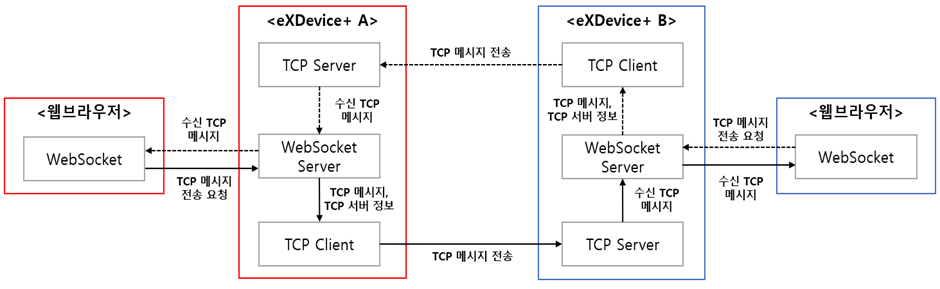
**&lt;eXDevice+간 TCP Socket 통신 구조&gt;**

 eXDevice+간 TCP Socket 통신을 위해 다음과 같은 정보가 필요하며, 해당 정보에 대한 관리는 별도의 서버 또는 시스템에서 CRUD가 지원되어야 합니다.

<table border="1" id="bkmrk-%EB%8D%B0%EC%9D%B4%ED%84%B0-%EC%A2%85%EB%A5%98-%EC%84%A4%EB%AA%85-%EC%9A%A9%EB%8F%84-%EB%B9%84%EA%B3%A0-ip-e" style="border-collapse: collapse; width: 100%; height: 119.188px;"><colgroup><col style="width: 12.3957%;"></col><col style="width: 26.6985%;"></col><col style="width: 42.1907%;"></col><col style="width: 18.7152%;"></col></colgroup><thead><tr style="height: 29.7969px;"><td class="align-center" style="height: 29.7969px;">**데이터 종류**</td><td class="align-center" style="height: 29.7969px;">**설명**</td><td class="align-center" style="height: 29.7969px;">**용도**</td><td class="align-center" style="height: 29.7969px;">**비고**</td></tr></thead><tbody><tr style="height: 29.7969px;"><td style="height: 29.7969px;">IP</td><td style="height: 29.7969px;">eXDevice+ TCP 서버 IP</td><td style="height: 29.7969px;">TCP 메시지를 수신 받기 위한 서버 IP</td><td style="height: 29.7969px;">로컬 IP</td></tr><tr style="height: 29.7969px;"><td style="height: 29.7969px;">Port</td><td style="height: 29.7969px;">eXDevice+ TCP 서버 port</td><td style="height: 29.7969px;">TCP 메시지를 수신 받기 위한 서버 port</td><td style="height: 29.7969px;">지정 port</td></tr><tr style="height: 29.7969px;"><td style="height: 29.7969px;">endpoint</td><td style="height: 29.7969px;">메시지를 수신할 client 정보</td><td style="height: 29.7969px;">최종적으로 메시지를 수신 받기 위한 client 식별 정보</td><td style="height: 29.7969px;">지정 endpoint 명</td></tr></tbody></table>

<p class="callout info"> *endpoint*는 `OpenTcpServer` 서비스를 호출하며 등록하는 정보이며, 원격 WebSocket client가 어떤 WebSocket client에게 메시지를 전송할지 식별하기 위한 정보입니다. 다시 말해, *endpoint*는 일종의 사용자 ID와 유사한 역할을 수행합니다.</p>

## 서비스 리스트

 원격 eXDevice+간 TCP Socket 통신 서비스 리스트는 다음과 같습니다.

<table border="1" id="bkmrk-no.-%EC%84%9C%EB%B9%84%EC%8A%A4%EB%AA%85-api%EB%AA%85-%EB%B9%84%EA%B3%A0-1-s" style="border-collapse: collapse; width: 100%;"><colgroup><col style="width: 7.03218%;"></col><col style="width: 28.9631%;"></col><col style="width: 33.969%;"></col><col style="width: 30.0358%;"></col></colgroup><thead><tr><td class="align-center">**No.**</td><td class="align-center">**서비스명**</td><td class="align-center">**API명**</td><td class="align-center">**비고**</td></tr></thead><tbody><tr><td class="align-center">1</td><td>Socket 서버 open</td><td>OpenTcpServer</td><td>서버 open, endpoint 등록</td></tr><tr><td class="align-center">2</td><td>Socket 서버 close</td><td>CloseTcpServer</td><td>서버 close, endpoint 제거</td></tr><tr><td class="align-center">3</td><td>Socket 서버 정보 획득</td><td>GetTcpServerInfo</td><td>  
</td></tr><tr><td class="align-center">4</td><td>endpoint 리스트 획득</td><td>GetTcpEndpoints</td><td>  
</td></tr><tr><td class="align-center">5</td><td>TCP 메시지 송신</td><td>SendTcpMessage</td><td>ReceiveTcpMessage로 메시지 수신</td></tr><tr><td class="align-center">6</td><td>TCP 메시지 수신</td><td>ReceiveTcpMessage</td><td>직접 호출 불가</td></tr></tbody></table>

## 서비스 상태 코드 리스트

 본 서비스에서 공통으로 사용되는 서비스 상태코드 리스트에 대해 정의합니다.

 이 상태 코드는 응답 JSON 메시지 중 *return* 또는 *returnValue*의 값에 해당합니다.

<table border="1" id="bkmrk-%EB%A6%AC%ED%84%B4%EC%BD%94%EB%93%9C-%EB%A6%AC%ED%84%B4-%EC%BD%94%EB%93%9C-%EB%82%B4%EC%9A%A9-%EB%8C%80%EC%83%81-%EC%84%9C%EB%B9%84%EC%8A%A4-1" style="border-collapse: collapse; width: 100%; height: 595.938px;"><colgroup><col style="width: 8.70083%;"></col><col style="width: 45.4112%;"></col><col style="width: 23.0036%;"></col><col style="width: 23.0036%;"></col></colgroup><thead><tr style="height: 29.7969px;"><td class="align-center" style="height: 29.7969px;">**리턴코드**</td><td class="align-center" style="height: 29.7969px;">**리턴 코드 내용**</td><td class="align-center" style="height: 29.7969px;">**대상 서비스**</td><td class="align-center" style="height: 29.7969px;">**비고**</td></tr></thead><tbody><tr style="height: 29.7969px;"><td class="align-center" style="height: 29.7969px;">-1</td><td style="height: 29.7969px;">정의되지 않은 예외</td><td style="height: 29.7969px;">공통</td><td style="height: 29.7969px;">Log 파일에서 내용 확인 필요</td></tr><tr style="height: 29.7969px;"><td class="align-center" style="height: 29.7969px;">0</td><td style="height: 29.7969px;">정상</td><td style="height: 29.7969px;">공통</td><td style="height: 29.7969px;">-</td></tr><tr style="height: 29.7969px;"><td class="align-center" style="height: 29.7969px;">1</td><td style="height: 29.7969px;">TCP 서버 open실패</td><td style="height: 29.7969px;">OpenTcpServer</td><td style="height: 29.7969px;">-</td></tr><tr style="height: 29.7969px;"><td class="align-center" style="height: 29.7969px;">2</td><td style="height: 29.7969px;">동일한 requestKey가 이미 등록됨</td><td style="height: 29.7969px;">OpenTcpServer</td><td style="height: 29.7969px;">-</td></tr><tr style="height: 29.7969px;"><td class="align-center" style="height: 29.7969px;">3</td><td style="height: 29.7969px;">동일한 endpoint가 이미 등록됨</td><td style="height: 29.7969px;">OpenTcpServer</td><td style="height: 29.7969px;">-</td></tr><tr style="height: 29.7969px;"><td class="align-center" style="height: 29.7969px;">4</td><td style="height: 29.7969px;">endpoint 등록 실패</td><td style="height: 29.7969px;">OpenTcpServer</td><td style="height: 29.7969px;">-</td></tr><tr style="height: 29.7969px;"><td class="align-center" style="height: 29.7969px;">5</td><td style="height: 29.7969px;">TCP 서버가 open 되어 있지 않음</td><td style="height: 29.7969px;">CloseTcpServer,

SendTcpMessage,

GetTcpServerInfo,

GetTcpEndpoint

</td><td style="height: 29.7969px;">-</td></tr><tr style="height: 29.7969px;"><td class="align-center" style="height: 29.7969px;">6</td><td style="height: 29.7969px;">endpoint가 등록되어 있지 않음</td><td style="height: 29.7969px;">CloseTcpServer,

GetTcpEndpoint

</td><td style="height: 29.7969px;">-</td></tr><tr style="height: 29.7969px;"><td class="align-center" style="height: 29.7969px;">7</td><td style="height: 29.7969px;">endpoint 제거 실패</td><td style="height: 29.7969px;">CloseTcpServer</td><td style="height: 29.7969px;">-</td></tr><tr style="height: 29.7969px;"><td class="align-center" style="height: 29.7969px;">8</td><td style="height: 29.7969px;">TCP 서버 종료 실패</td><td style="height: 29.7969px;">CloseTcpServer</td><td style="height: 29.7969px;">-</td></tr><tr style="height: 29.7969px;"><td class="align-center" style="height: 29.7969px;">9</td><td style="height: 29.7969px;">TCP 메시지 전송 실패</td><td style="height: 29.7969px;">SendTcpMessage</td><td style="height: 29.7969px;">-</td></tr><tr style="height: 29.7969px;"><td class="align-center" style="height: 29.7969px;">10</td><td style="height: 29.7969px;">원격 eXDevice+ TCP 서버 연결 실패</td><td style="height: 29.7969px;">SendTcpMessage</td><td style="height: 29.7969px;">-</td></tr><tr style="height: 29.7969px;"><td class="align-center" style="height: 29.7969px;">11</td><td style="height: 29.7969px;">원격 eXDevice+의 endpoint가 연결 해제됨</td><td style="height: 29.7969px;">SendTcpMessage</td><td style="height: 29.7969px;">-</td></tr><tr style="height: 29.7969px;"><td class="align-center" style="height: 29.7969px;">12</td><td style="height: 29.7969px;">원격 eXDevice+로 부터 TCP 수신 응답 획득 실패</td><td style="height: 29.7969px;">SendTcpMessage</td><td style="height: 29.7969px;">-</td></tr><tr style="height: 29.7969px;"><td class="align-center" style="height: 29.7969px;">13</td><td style="height: 29.7969px;">원격 eXDevice+가 TCP 메시지 처리 중 오류 발생</td><td style="height: 29.7969px;">SendTcpMessage</td><td style="height: 29.7969px;">-</td></tr><tr style="height: 29.7969px;"><td class="align-center" style="height: 29.7969px;">14</td><td style="height: 29.7969px;">원격 eXDevice+에 요청한 endpoint가 등록되어 있지 않음</td><td style="height: 29.7969px;">SendTcpMessage</td><td style="height: 29.7969px;">-</td></tr><tr style="height: 29.7969px;"><td class="align-center" style="height: 29.7969px;">15</td><td style="height: 29.7969px;">원격 eXDevice+가 endpoint에게 메시지 전송 중 연결 해제됨</td><td style="height: 29.7969px;">SendTcpMessage</td><td style="height: 29.7969px;">-</td></tr><tr style="height: 29.7969px;"><td class="align-center" style="height: 29.7969px;">16</td><td style="height: 29.7969px;">지정한 port 외 다른 port로 TCP 서버 open 됨</td><td style="height: 29.7969px;">OpenTcpServer</td><td style="height: 29.7969px;">-</td></tr><tr style="height: 29.7969px;"><td class="align-center" style="height: 29.7969px;">17</td><td style="height: 29.7969px;">지정한 port가 다른 프로그램에서 사용 중</td><td style="height: 29.7969px;">OpenTcpServer</td><td style="height: 29.7969px;">-</td></tr></tbody></table>


## 1. Socket 서버 open

**API명**

- OpenTcpServer

**정의**

- 원격 eXDevice+로부터 TCP 메시지를 수신하기 위해 TCP 서버를 open하고, 메시지를 수신할 WebSocket client의 식별 정보를 등록합니다.
- TCP 서버가 다른 WebSocket client에 의해 open 되어 있는 경우, 별도의 TCP 서버를 open 하지 않고 WebSocket client의 식별 정보를 추가 등록합니다.

**설명**

- WebSocket client는 자신에게 송신 된 메시지를 식별하기 위해 서비스 호출 시 전달한 *requestKey*를 사용하며, TCP 메시지는 WebSocket 이벤트 중 *onmessage* 이벤트를 통해 수신합니다.
- TCP 서버 open에 성공 한 경우 관리 서버 등에 IP, port, endpoint 정보를 등록해 사용할 수 있습니다.

<p class="callout success">TCP 메시지를 수신 받는 WebSocket client의 프로토콜은 `ReceiveTcpMessage`를 참고하시길 바랍니다.</p>


<p class="callout warning"> eXDevice+는 TCP 서버 open 시 해당 PC의 IPv4 주소와, 입력한 port 넘버를 기준으로 서버를 open 합니다. 이때, eXDevice+는 하나의 TCP 서버만 open 할 수 있습니다.</p>

**호출 예시**

```json
{
  "service": "OpenTcpServer",
  "requestKey": "Random Request Key",
  "param": {
    "endpoint": "administrator"
  }
}
```

- requestKey 
    - TCP 메시지 수신 시 TCP 메시지를 식별하기 위한 Key.
    - `CloseTcpServer`를 호출 하기 전 까지 관리되어야 하는 정보.
- endpoint 
    - 원격 eXDevice+에서 특정 WebSocket client를 식별하기 위한 식별 정보.
- port 
    - TCP 서버를 open 하기 위한 port 넘버.
    - IP는 해당 PC의 IPv4 주소.

**응답 예시**

```json
{
  "service":"OpenTcpServer",
  "requestKey":"호출시 사용한 Request Key",
  "statusCode":"0000",
  "return":0
}
```

- return 
    - 서비스 상태 코드.

## 2. Socket 서버 close

**API명**

- CloseTcpServer

**정의**

- 등록한 endpoint를 제거하고 TCP 서버를 Close 합니다.
- 만약 서비스 호출 후 등록된 endpoint가 남아 있는 경우 요청한 endpoint만 제거하고 서버는 open 상태를 유지하며, 모든 endpoint가 제거되는 경우 eXDevice+는 TCP 서버를 Close합니다.

**설명**

- WebSocket client가 endpoint를 제거하지 않고 eXDevice+와 WebSocket 연결이 해제되는 경우, eXDevice+는 해당 WebSocket client가 등록한 모든 endpoint를 제거합니다.

<p class="callout warning">endpoint는 자신이 등록한 endpoint만을 제거할 수 있습니다.</p>

**호출 예시**

```json
{
  "service": "CloseTcpServer",
  "requestKey": "Random Request Key",
  "param": {
    "endpoint": "제거할 endpoint"
  }
}
```

- endpoint 
    - `OpenTcpServer`로 등록한 endpoint.

**응답 예시**

```json
{
  "service":"CloseTcpServer",
  "requestKey":"호출시 사용한 Request Key",
  "statusCode":"0000",
  "return":0
}
```

- return 
    - 서비스 상태 코드.

## 3. Socket 서버 정보 획득

**API명**

- GetTcpServerInfo

**정의**

- 현재 open된 TCP 서버의 IP, port 정보를 획득합니다.

**호출 예시**

```json
{
  "service": "GetTcpServerInfo",
  "requestKey": "Random Request Key",
  "param": {}
}
```

**응답 예시**

```json
{
  "service":"GetTcpServerInfo",
  "requestKey":"호출시 사용한 Request Key",
  "statusCode":"0000",
  "return":{
    "returnValue": 0,
    "ip": "123.123.123.123",
    "port":13441
  }
}
```

- returnValue 
    - 서비스 상태 코드.
- ip 
    - open된 TCP 서버 IP.
- port 
    - open된 TCP 서버 port.

## 4. endpoint 리스트 획득

**API명**

- GetTcpEndpoints

**정의**

- 서비스를 호출한 WebSocket client가 등록한 모든 endpoint 리스트를 획득합니다.

<p class="callout warning"> 다른 WebSocket client가 등록한 endpoint의 정보는 조회할 수 없습니다.</p>

**호출 예시**

```json
{
  "service": "GetTcpEndpoints",
  "requestKey": "Random Request Key...",
  "param": {}
}
```

**응답 예시**

```json
{
  "service": "GetTcpEndpoints",
  "requestKey": "호출시 사용한 Request Key",
  "statusCode": "0000",
  "return":{
    "returnValue": 0,
    "endpointInfo": [
      {"requestKey":"9e1f-7026-863f","endpoint":"endpoint1"},
      {"requestKey":"797a-250c-7c94","endpoint":"endpoint2"}
    ]
  }
}
```

- returnValue 
    - 서비스 상태 코드.
- endpointInfo: WebSocket client가 등록한 모든 requestKey 및 endpoint 정보 배열. 
    - requestKey 
        - WebSocket client가 TCP 메시지를 식별하기 위해 등록한 requestKey.
    - endpoint 
        - WebSocket client가 원격 eXDevice+가 자신을 식별할 수 있도록 등록한 식별 정보.

## 5. TCP 메시지 송신

**API명**

- SendTcpMessage

**정의**

- 원격 eXDevice+에게 TCP 메시지를 송신합니다.

**설명**

- TCP 메시지의 최종 종착지는 원격 eXDevice+에 endpoint를 등록한 WebSocket client입니다.
- 본 서비스는 송신하는 메시지의 형태에 따라 다음과 같이 구분됩니다.

<table border="1" id="bkmrk-%EC%86%A1%EC%8B%A0-%ED%83%80%EC%9E%85-%EC%84%A4%EB%AA%85-%EB%B9%84%EA%B3%A0-tcp-%EB%A9%94%EC%8B%9C%EC%A7%80-" style="border-collapse: collapse; width: 100%;"><colgroup><col style="width: 25.5066%;"></col><col style="width: 50.7634%;"></col><col style="width: 23.8493%;"></col></colgroup><thead><tr><td class="align-center">**송신 타입**</td><td class="align-center">**설명**</td><td class="align-center">**비고**</td></tr></thead><tbody><tr><td>TCP 메시지 송신</td><td>TCP 메시지를 송신하되, WebSocket client의 응답을 받지 않습니다.</td><td>  
</td></tr><tr><td>응답이 필요한 TCP 메시지 송신</td><td>TCP 메시지를 송신하고, WebSocket client의 응답을 받습니다.</td><td>  
</td></tr></tbody></table>

<p class="callout info">응답 필요 유무는 서비스 호출 시 송신자의 endpoint 정보 포함 유무에 따라 나뉩니다.</p>

**호출 예시**

**1. TCP 메시지 송신**

 응답이 필요하지 않은 TCP 메시지를 송신할 때, 송신자는 수신자가 자신을 식별할 수 있는 이름(*name*) 정보만 기입합니다.

```json
{
  "service": "SendTcpMessage",
  "requestKey": "Random Request Key",
  "param": {
    "sender":{
      "name":"수신자가 식별할 수 있는 이름"
    },
    "receiver":{
      "ip":"123.123.123.123",
      "port":13441,
      "endpoint":"수신자가 eXDevice+에 등록한 endpoint"
    },
    "message":"송신하고자 하는 메시지"
  }
}
```

- sender: TCP 메시지 송신자 정보. 
    - name 
        - 수신자가 식별할 수 있는 이름.
- receiver: TCP 메시지 수신자 정보. 
    - ip 
        - 원격 eXDevice+ TCP 서버 IP.
    - port 
        - 원격 eXDevice+ TCP 서버 port.
    - endpoint 
        - 메시지를 수신한 원격 eXDevice+가 WebSocket client에게 TCP 메시지를 전달하기 위한 데이터.
        - 수신자가 등록한 endpoint 정보.
- message 
    - 송신할 메시지.

**2. 응답이 필요한 TCP 메시지 송신**

 응답이 필요한 TCP 메시지를 송신할 때 송신자는 `OpenTcpServer`를 통해 응답 메시지를 수신 받을 TCP 서버를 반드시 open 해야 합니다. 송신자는 TCP 메시지 송신 시 수신자가 송신자인 WebSocket client를 식별할 수 있는 endpoint 정보를 함께 기입합니다.

```json
{
  "service": "GetTcpEndpoints",
  "requestKey": "Random Request Key",
  "param": {
    "sender":{
      "name":"수신자가 식별할 수 있는 이름",
      "endpoint":"응답 메시지를 수신 받기 위해 등록한 endpoint"
    },
    "receiver":{
      "ip":"123.123.123.123",
      "port":13441,
      "endpoint":"수신자가 eXDevice+에 등록한 endpoint"
    },
    "message":"송신하고자 하는 메시지"
  }
}
```

- sender: TCP 메시지 송신자 정보. 
    - name 
        - 수신자가 식별할 수 있는 이름
    - endpoint 
        - 원격 eXDevice+에게 TCP 메시지를 보낼 때 최종 종착지가 될 수신자(WebSocket client) 식별 정보.
- receiver: TCP 메시지를 수신할 수신자 정보. 
    - ip 
        - 원격 eXDevice+ TCP 서버 IP.
    - port 
        - 원격 eXDevice+ TCP 서버 port.
    - endpoint 
        - 메시지를 수신한 원격 eXDevice+가 WebSocket client에게 TCP 메시지를 전달하기 위한 데이터.
        - 수신자가 등록한 endpoint 정보.
    - message 
        - 송신할 메시지.

**응답 예시**

```json
{
  "service":"SendTcpMessage",
  "requestKey":"호출시 사용한 Request Key",
  "statusCode":"0000",
  "return":0
}
```

- return 
    - 서비스 상태 코드.

## 6. TCP 메시지 수신

**API명**

- SendTcpMessage

**정의**

- 다른 원격 eXDevice+가 송신한 TCP 메시지를 수신합니다.

**설명**

- `SendTcpMessage`로 다른 원격 eXDevice+가 자신에게 송신한 메시지를 본 서비스를 통해 수신 받습니다.
- 본 서비스로 TCP 메시지를 수신 받으려면 WebSocket 이벤트 중 *onmessage* 이벤트를 통해 수신합니다.

<p class="callout warning">본 서비스는 직접 호출할 수 없습니다.</p>

**응답 예시**

**1. TCP 메시지 수신**

 일반 TCP 메시지의 경우 송신자의 최소 정보(송신자 식별 정보)만이 메시지에 포함됩니다.

```json
{
  "service":"ReceiveTcpMessage",
  "requestKey":"OpenTcpServer 호출 시 전달한 requestKey",
  "sender":{
    "name":"송신자 식별 정보"
  },
  "message":"TCP 메시지"
}
```

- requestKey 
    - TCP 메시지를 수신한 수신자가 메시지를 수신 받기 위해 *OpenTcpServer* 서비스 호출 시 사용한 *requestKey*.
- sender: TCP 메시지를 송신한 송신자 정보. 
    - name 
        - TCP 메시지를 송신한 송신자 식별 정보.
- message 
    - 송신자가 전달한 실제 메시지.

**2. 응답이 필요한 TCP 메시지 수신**

 응답이 필요한 TCP 메시지는 송신자의 eXDevice+ TCP 서버 정보 및, 메시지를 수신 받기 위한 WebSocket client의 식별 정보가 함께 전달됩니다.

```json
{
  "service":"ReceiveTcpMessage",
  "requestKey":"OpenTcpServer 호출 시 전달한 requestKey",
  "sender":{
    "ip":"123.123.123.123",
    "port":13441,
    "endpoint":"WebSocket Client 식별 정보"
    "name":"송신자 식별 정보"
  },
  "message":"TCP 메시지"
}
```

- requestKey 
    - TCP 메시지를 수신한 수신자가 메시지를 수신 받기 위해 *OpenTcpServer* 서비스 호출 시 사용한 *requestKey.*
- sender: TCP 메시지를 송신한 송신자 정보. 
    - ip 
        - TCP 메시지를 송신한 송신자의 원격 eXDevice+ TCP Socket Server IP.
    - port 
        - TCP 메시지를 송신한 송신자의 원격 eXDevice+ TCP Socket Server port.
    - endpoint 
        - TCP 메시지를 송신한 송신자의 WebSocket client 식별 정보.
        - 즉, 송신자의 eXDevice+가 어떤 WebSocket client에게 TCP 메시지를 보내야 할지 식별할 수 있는 정보.
    - name 
        - TCP 메시지를 송신한 송신자 식별 정보.
- message 
    - 송신자가 전달한 실제 메시지.

# Network 관련 서비스

 본 서비스는 eXDevice+가 설치된 로컬 PC의 네트워크 관련 정보 획득을 지원합니다.

## 서비스 리스트

 Network 관련 서비스 리스트는 다음과 같습니다.

<table border="1" id="bkmrk-no.-%EC%84%9C%EB%B9%84%EC%8A%A4%EB%AA%85-api-%EB%AA%85-%EB%B9%84%EA%B3%A0-1-" style="border-collapse: collapse; width: 100%;"><colgroup><col style="width: 7.03218%;"></col><col style="width: 28.9631%;"></col><col style="width: 33.969%;"></col><col style="width: 30.0358%;"></col></colgroup><thead><tr><td class="align-center">**No.**</td><td class="align-center">**서비스명**</td><td class="align-center">**API 명**</td><td class="align-center">비고</td></tr></thead><tbody><tr><td class="align-center">1</td><td>로컬 IPv4 주소 획득</td><td>WinInfo.GetIpAddress</td><td>  
</td></tr><tr><td class="align-center">2</td><td>로컬 MAC 주소 획득</td><td>WinInfo.GetMacAddress</td><td>  
</td></tr></tbody></table>

## 서비스 상태 코드 리스트

 본 서비스에서 공통으로 사용되는 서비스 상태코드 리스트에 대해 정의합니다.

 이 상태 코드는 응답 JSON 메시지 중 *return* 또는 *returnValue*의 값에 해당합니다.

<table border="1" id="bkmrk-%EB%A6%AC%ED%84%B4%EC%BD%94%EB%93%9C-%EB%A6%AC%ED%84%B4-%EC%BD%94%EB%93%9C-%EB%82%B4%EC%9A%A9-%EB%8C%80%EC%83%81-%EC%84%9C%EB%B9%84%EC%8A%A4-2" style="border-collapse: collapse; width: 100%; height: 595.938px;"><colgroup><col style="width: 8.70083%;"></col><col style="width: 45.4112%;"></col><col style="width: 23.0036%;"></col><col style="width: 23.0036%;"></col></colgroup><thead><tr style="height: 29.7969px;"><td class="align-center" style="height: 29.7969px;">**리턴코드**</td><td class="align-center" style="height: 29.7969px;">**리턴 코드 내용**</td><td class="align-center" style="height: 29.7969px;">**대상 서비스**</td><td class="align-center" style="height: 29.7969px;">**비고**</td></tr></thead><tbody><tr style="height: 29.7969px;"><td class="align-center" style="height: 29.7969px;">-1</td><td style="height: 29.7969px;">정의되지 않은 예외</td><td style="height: 29.7969px;">공통</td><td style="height: 29.7969px;">Log 파일에서 내용 확인 필요</td></tr><tr style="height: 29.7969px;"><td class="align-center" style="height: 29.7969px;">0</td><td style="height: 29.7969px;">정상</td><td style="height: 29.7969px;">공통</td><td style="height: 29.7969px;">-</td></tr><tr style="height: 29.7969px;"><td class="align-center" style="height: 29.7969px;">1</td><td style="height: 29.7969px;">시스템 Lan 카드 정보 획득 실패</td><td style="height: 29.7969px;">WinInfo.GetIpAddress</td><td style="height: 29.7969px;">-</td></tr></tbody></table>

## 1. 로컬 IPv4 주소 획득

**API명**

- WinInfo.GetIpAddress

**정의**

- 로컬 PC에서 활성화된 Lan 카드의 IPv4 주소를 획득합니다.


**호출 예시**

```json
{
  "service":"WinInfo.GetIpAddress",
  "requestKey":"Random Request Key",
  "param":{}
}
```

**응답 예시**

```json
{
  "service":"WinInfo.GetIpAddress",
  "requestKey":"호출시 사용한 Request Key",
  "statusCode":"0000",
  "return":{
    "returnValue":0,
    "systemIpv4":"123.123.123.123"
  }
}
```

- returnValue 
    - 서비스 상태 코드.
- systemIpv4 
    - 활성 된 Lan 카드 IPv4 주소.

## 2. 로컬 MAC 주소 획득

**API명**

- WinInfo.GetMacAddress

**정의**

- 현재 활성화된 Lan 카드의 MAC 주소를 획득합니다.

**호출 예시**

```json
{
  "service":"WinInfo.GetMacAddress",
  "requestKey":"Random Request Key",
  "param":{}
}
```

**응답 예시**

```json
{
  "service":"WinInfo.GetMacAddress",
  "requestKey":"호출시 사용한 Request Key",
  "statusCode":"0000",
  "return":{
    "returnValue":0,
    "systemMacAddr":"ABCDEF12345"
  }
}
```

- returnValue 
    - 서비스 상태 코드.
- systemIpv4 
    - 활성 된 Lan 카드 MAC 주소.

# 모니터 관련 서비스

 본 서비스는 eXDevice+가 설치된 PC에 연결된 모니터의 정보 획득을 지원합니다.

## 서비스 리스트

 모니터 관련 서비스 리스트는 다음과 같습니다.

<table border="1" id="bkmrk-no.-%EC%84%9C%EB%B9%84%EC%8A%A4%EB%AA%85-api%EB%AA%85-%EB%B9%84%EA%B3%A0-1-%EC%97%B0" style="border-collapse: collapse; width: 100%; height: 178.781px;"><colgroup><col style="width: 7.03218%;"></col><col style="width: 28.9631%;"></col><col style="width: 33.969%;"></col><col style="width: 30.0358%;"></col></colgroup><thead><tr style="height: 29.7969px;"><td class="align-center" style="height: 29.7969px;">**No.**</td><td class="align-center" style="height: 29.7969px;">**서비스명**</td><td class="align-center" style="height: 29.7969px;">**API명**</td><td class="align-center" style="height: 29.7969px;">비고</td></tr></thead><tbody><tr style="height: 29.7969px;"><td class="align-center" style="height: 29.7969px;">1</td><td style="height: 29.7969px;">연결된 모니터 개수 획득</td><td style="height: 29.7969px;">WinInfo.GetConnectedScreenNumber</td><td style="height: 29.7969px;">  
</td></tr><tr style="height: 29.7969px;"><td class="align-center" style="height: 29.7969px;">2</td><td style="height: 29.7969px;">주 모니터 식별</td><td style="height: 29.7969px;">WinInfo.PrimaryScreen</td><td style="height: 29.7969px;">  
</td></tr><tr style="height: 29.7969px;"><td class="align-center" style="height: 29.7969px;">3</td><td style="height: 29.7969px;">전체 모니터 식별</td><td style="height: 29.7969px;">WinInfo.GetAllScreens</td><td style="height: 29.7969px;">  
</td></tr><tr style="height: 29.7969px;"><td class="align-center" style="height: 29.7969px;">4</td><td style="height: 29.7969px;">주 모니터 해상도 획득</td><td style="height: 29.7969px;">WinInfo.GetPrimaryResolution</td><td style="height: 29.7969px;">  
</td></tr><tr style="height: 29.7969px;"><td class="align-center" style="height: 29.7969px;">5</td><td style="height: 29.7969px;">지정 모니터 해상도 획득</td><td style="height: 29.7969px;">WinInfo.GetSpecialScreenResolution</td><td style="height: 29.7969px;">  
</td></tr><tr><td class="align-center">6</td><td style="height: 29.7969px;">전체 모니터 해상도 획득</td><td style="height: 29.7969px;">WinInfo.GetAllScreenResolutions</td><td>  
</td></tr></tbody></table>

## 서비스 상태 코드 리스트

 본 서비스에서 공통으로 사용되는 서비스 상태코드 리스트에 대해 정의합니다.

 이 상태 코드는 응답 JSON 메시지 중 *return* 또는 *returnValue*의 값에 해당합니다.

<table border="1" id="bkmrk-%EB%A6%AC%ED%84%B4%EC%BD%94%EB%93%9C-%EB%A6%AC%ED%84%B4-%EC%BD%94%EB%93%9C-%EB%82%B4%EC%9A%A9-%EB%8C%80%EC%83%81-%EC%84%9C%EB%B9%84%EC%8A%A4-3" style="border-collapse: collapse; width: 100%; height: 195.578px;"><colgroup><col style="width: 8.70083%;"></col><col style="width: 44.2206%;"></col><col style="width: 24.1942%;"></col><col style="width: 23.0036%;"></col></colgroup><thead><tr style="height: 29.7969px;"><td class="align-center" style="height: 29.7969px;">**리턴코드**</td><td class="align-center" style="height: 29.7969px;">**리턴 코드 내용**</td><td class="align-center" style="height: 29.7969px;">**대상 서비스**</td><td class="align-center" style="height: 29.7969px;">**비고**</td></tr></thead><tbody><tr style="height: 29.7969px;"><td class="align-center" style="height: 29.7969px;">-1</td><td style="height: 29.7969px;">정의되지 않은 예외</td><td style="height: 29.7969px;">공통</td><td style="height: 29.7969px;">Log 파일에서 내용 확인 필요</td></tr><tr style="height: 29.7969px;"><td class="align-center" style="height: 29.7969px;">0</td><td style="height: 29.7969px;">정상</td><td style="height: 29.7969px;">공통</td><td style="height: 29.7969px;">-</td></tr><tr style="height: 46.5938px;"><td class="align-center" style="height: 46.5938px;">2</td><td style="height: 46.5938px;">PC와 연결된 모니터 리스트 획득 실패</td><td style="height: 46.5938px;"><span lang="EN-US" style="font-size: 10.0pt; mso-bidi-font-size: 11.0pt; font-family: '맑은 고딕'; mso-hansi-font-family: 굴림; mso-bidi-font-family: 'Times New Roman'; mso-font-kerning: 1.0pt; mso-ansi-language: EN-US; mso-fareast-language: KO; mso-bidi-language: AR-SA;">GetConnectedScreenNumber,</span>

<span lang="EN-US" style="font-size: 10.0pt; mso-bidi-font-size: 11.0pt; font-family: '맑은 고딕'; mso-hansi-font-family: 굴림; mso-bidi-font-family: 'Times New Roman'; mso-font-kerning: 1.0pt; mso-ansi-language: EN-US; mso-fareast-language: KO; mso-bidi-language: AR-SA;">GetAllScreens</span>

</td><td style="height: 46.5938px;">-</td></tr><tr style="height: 29.7969px;"><td class="align-center" style="height: 29.7969px;">3</td><td style="height: 29.7969px;">요청 모니터 정보 획득 실패</td><td style="height: 29.7969px;"><span lang="EN-US" style="font-size: 10.0pt; mso-bidi-font-size: 11.0pt; font-family: '맑은 고딕'; mso-hansi-font-family: 굴림; mso-bidi-font-family: 'Times New Roman'; mso-font-kerning: 1.0pt; mso-ansi-language: EN-US; mso-fareast-language: KO; mso-bidi-language: AR-SA;">PrimaryScreen,</span>

<span lang="EN-US" style="font-size: 10.0pt; mso-bidi-font-size: 11.0pt; font-family: '맑은 고딕'; mso-hansi-font-family: 굴림; mso-bidi-font-family: 'Times New Roman'; mso-font-kerning: 1.0pt; mso-ansi-language: EN-US; mso-fareast-language: KO; mso-bidi-language: AR-SA;">GetPrimaryResolution</span>

</td><td style="height: 29.7969px;">  
</td></tr><tr style="height: 29.7969px;"><td class="align-center" style="height: 29.7969px;">4</td><td style="height: 29.7969px; text-align: justify;">모니터 해상도 획득 실패</td><td style="height: 29.7969px;"><span lang="EN-US" style="font-size: 10.0pt; mso-bidi-font-size: 11.0pt; font-family: '맑은 고딕'; mso-hansi-font-family: 굴림; mso-bidi-font-family: 'Times New Roman'; mso-font-kerning: 1.0pt; mso-ansi-language: EN-US; mso-fareast-language: KO; mso-bidi-language: AR-SA;">GetPrimaryResolution</span></td><td style="height: 29.7969px;">  
</td></tr></tbody></table>

## 1. 연결된 모니터 개수 획득

**API명**

- WinInfo.GetConnectedScreenNumber

**정의**

- PC에 물리적으로 연결된 모든 모니터의 개수를 획득합니다.

**호출 예시**

```json
{
  "service":"WinInfo.GetConnectedScreenNumber",
  "requestKey":"Random Request Key",
  "param":{}
}
```

**응답 예시**

```json
{
  "service":"WinInfo.GetConnectedScreenNumber",
  "requestKey":"호출시 사용한 Request Key",
  "statusCode":"0000",
  "return":{
    "returnValue":0,
    "screenNumber":3
  }
}
```

- returnValue 
    - 서비스 상태 코드.
- screenNumber 
    - 연결된 모니터 개수.

## 2. 주 모니터 식별

**API명**

- WinInfo.PrimaryScreen

**정의**

- PC에 물리적으로 연결 된 모니터 중 주 모니터로 설정된 모니터의 시스템 식별 이름을 획득합니다.

**설명**

- 시스템은 모니터를 식별할 때 그래픽 카드 슬롯에 연결된 모니터를 인식하며, 그래픽 카드 슬롯의 위치에 따라 "DISPLAY + 숫자"형식의 이름으로 모니터를 식별합니다.
- DISPLAY 뒤에 붙는 숫자는 PC의 메인보드, 그래픽카드의 정책에 따라 상이합니다.

<p class="callout warning">모니터 이름은 시스템이 해당 모니터를 식별하기 위해 임의로 발급한 이름입니다. 즉, 본 서비스를 통해 획득하는 모니터의 이름은 제조사, 모델명과 무관한 이름입니다.</p>

**호출 예시**

```json
{
  "service":"WinInfo.GetPrimaryScreen",
  "requestKey":"Random Request Key",
  "param":{}
}
```

**응답 예시**

```json
{
  "service":"WinInfo.GetPrimaryScreen",
  "requestKey":"호출시 사용한 Request Key",
  "statusCode":"0000",
  "return":{
    "returnValue":0,
    "primaryScreen":"DISPLAY5"
  }
}
```

- returnValue 
    - 서비스 상태 코드.
- primaryScreen 
    - 주 모니터 시스템 식별 이름.

## 3. 전체 모니터 식별

**API명**

- WinInfo.GetAllScreens

**정의**

- PC에 연결된 모든 모니터의 시스템 식별 이름을 획득합니다.

**설명**

- 시스템은 모니터를 식별할 때 그래픽 카드 슬롯에 연결된 모니터를 인식하며, 그래픽 카드 슬롯의 위치에 따라 "DISPLAY + 숫자"형식의 이름으로 모니터를 식별합니다.
- DISPLAY 뒤에 붙는 숫자는 PC의 메인보드, 그래픽카드의 정책에 따라 상이합니다.

<p class="callout warning">모니터 이름은 시스템이 해당 모니터를 식별하기 위해 임의로 발급한 이름입니다. 즉, 본 서비스를 통해 획득하는 모니터의 이름은 제조사, 모델명과 무관한 이름입니다.</p>

**호출 예시**

```json
{
  "service":"WinInfo.GetAllScreens",
  "requestKey":"Random Request Key",
  "param":{}
}
```

**응답 예시**

```json
{
  "service":"WinInfo.GetAllScreens",
  "requestKey":"호출시 사용한 Request Key",
  "statusCode":"0000",
  "return":{
    "returnValue":0,
    "screenInfos":{
      "Screen0":"DISPLAY1",
      "Screen1":"DISPLAY5",
      "Screen2":"DISPLAY4"
    }
  }
}
```

- returnValue 
    - 서비스 상태 코드.
- screenInfos: 연결된 모든 모니터 식별 이름. 
    - Screen + 숫자 
        - eXDevice+에서 Screen을 구분 짓기 위한 Key.
    - DISPLAY + 숫자 
        - 시스템이 모니터를 식별하기 위한 이름.

## 4. 주 모니터 해상도 획득

**API명**

- WinInfo.GetPrimaryResolution

**정의**

- PC에 연결된 모니터 중 주 모니터의 좌측 상단 시작 좌표 (left, top) 및 모니터의 해상도(width, height)를 획득합니다.

**설명**

- 시스템은 모니터의 좌표 및 해상도를 다음과 같이 식별합니다.

[![K-017.png](https://bookstack.tomatosystem.co.kr/uploads/images/gallery/2025-12/scaled-1680-/k-017.png)](https://bookstack.tomatosystem.co.kr/uploads/images/gallery/2025-12/k-017.png)
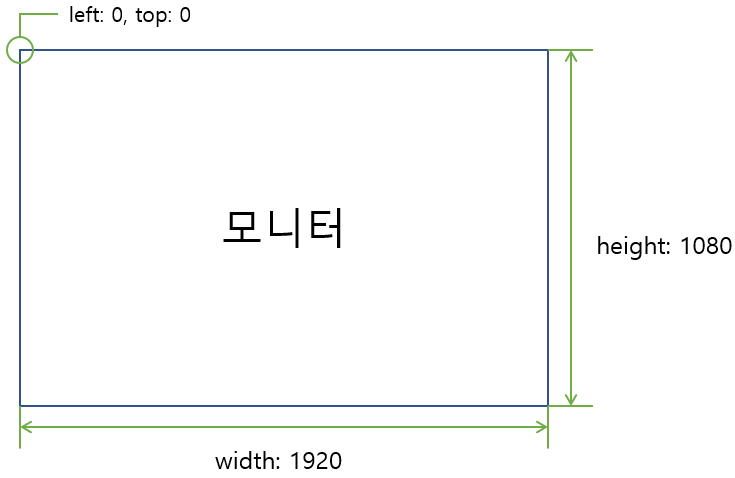
**&lt;Windows 모니터 해상도 식별 방식&gt;**

**호출 예시**

```json
{
  "service": "WinInfo.GetPrimaryResolution",
  "requestKey":"Random Request Key",
  "param":{}
}
```

**응답 예시**

```json
{
  "service":"WinInfo.GetPrimaryResolution",
  "requestKey":"호출시 사용한 Request Key",
  "statusCode":"0000",
  "return":{
    "returnValue":0,
    "screenResolution":{
      "width":1920,
      "height":1080,
      "left":0,
      "top":0
    }
  }
}
```

- returnValue 
    - 서비스 상태 코드.
- screenResuolution: 대상 모니터 좌표 및 해상도 정보. 
    - width 
        - 모니터 가로 길이.
    - height 
        - 모니터 세로 길이.
    - left 
        - 모니터 좌측 시작 좌표.
    - top 
        - 모니터 상단 시작 좌표.

### 5. 지정 모니터 해상도 획득

**API명**

- WinInfo.GetSpecialScreenResolution

**정의**

- PC에 연결된 모니터 중 사용자가 지정한 모니터의 좌측 상단 시작 좌표 (left, top) 및 모니터의 해상도(width, height)를 획득합니다.

**설명**

- 시스템은 모니터 좌표 식별 시 주 모니터를 기준으로 다른 모니터들의 좌표를 식별합니다.
- 즉, 주 모니터의 left, top은 항상 0, 0이며, 보조 모니터들은 주 모니터의 좌표를 기준으로 left, top의 좌표가 식별 됩니다.

[![image.png](https://bookstack.tomatosystem.co.kr/uploads/images/gallery/2025-12/scaled-1680-/image.png)](https://bookstack.tomatosystem.co.kr/uploads/images/gallery/2025-12/image.png)**&lt;해상도가 동일한 주 모니터, 보조 모니터 좌표 예시&gt;**
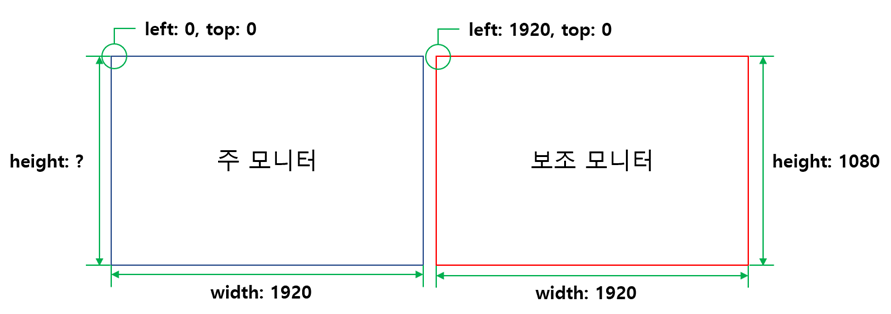
**호출 예시**

```json
{
  "service": "WinInfo.GetSpecialScreenResolution",
  "requestKey": "Random Request Key",
  "param": { 
    "screenIndex": 1
  }
}
```

- screenIndex 
    - 좌표 및 해상도 정보를 획득할 모니터의 인덱스.
    - 시스템이 인식하는 모니터 명칭에서 숫자 값. (예: DISPLAY4 → 4)

**응답 예시**

```json
{
  "service":"WinInfo.GetSpecialScreenResolution",
  "requestKey":"호출시 사용한 Request Key",
  "statusCode":"0000",
  "return":{
    "returnValue":0,
    "screenResolution":{
      "width":1920,
      "height":1080,
      "left":-1920,
      "top":0
    }
  }
}
```

- returnValue 
    - 서비스 상태 코드.
- screenResolution: 모니터 좌표 및 해상도. 
    - width 
        - 모니터 가로 길이.
    - height 
        - 모니터 세로 길이.
    - left 
        - 모니터 좌측 시작 좌표.
        - 주 모니터 외 모니터는 주 모니터 기준 좌표.
    - top 
        - 모니터 상당 시작 좌표.
        - 주 모니터 외 모니터는 주 모니터 기준 좌표.

### 6. 전체 모니터 해상도 획득

**API명**

- WinInfo.GetAllScreenResolutions

**정의**

- PC에 연결된 모든 모니터의 좌측 상단 시작 좌표 (left, top) 및 모니터의 해상도(width, height)를 획득합니다.

**설명**

- 시스템은 모니터 좌표 식별 시 주 모니터를 기준으로 다른 모니터들의 좌표를 식별합니다.
- 즉, 주 모니터의 left, top은 항상 0, 0이며, 보조 모니터들은 주 모니터의 좌표를 기준으로 left, top의 좌표가 식별 됩니다.

[![image.png](https://bookstack.tomatosystem.co.kr/uploads/images/gallery/2025-12/scaled-1680-/image.png)](https://bookstack.tomatosystem.co.kr/uploads/images/gallery/2025-12/image.png)**&lt;해상도가 동일한 주 모니터, 보조 모니터 좌표 예시&gt;**

**호출 예시**

```json
{
  "service":"WinInfo.GetAllScreenResolutions",
  "requestKey":"Random Request Key",
  "param":{}
}
```

**응답 예시**

```json
{
  "service":"WinInfo.GetAllScreenResolutions",
  "requestKey":"f3a5-4de9-8fbb",
  "statusCode":"0000",
  "return":{
    "returnValue":0,
    "screenResolution":[
      {"name":"DISPLAY1","width":1920,"height":1080,"left":-1920,"top":0},
      {"name":"DISPLAY5","width":1920,"height":1080,"left":0,"top":0},
      {"name":"DISPLAY4","width":1080,"height":1920,"left":1920,"top":-543}
    ]
  }
}
```

- returnValue 
    - 서비스 상태 코드.
- screenResolution: PC에 연결된 모니터 시스템 이름, 좌표 및 해상도 정보 배열. 
    - name 
        - 시스템이 식별한 모니터 이름.
    - width 
        - 모니터 가로 길이.
    - height 
        - 모니터 세로 길이.
    - left 
        - 모니터 좌측 시작 좌표.
        - 주 모니터 외 모니터는 주 모니터 기준 좌표.
    - top 
        - 모니터 상당 시작 좌표.
        - 주 모니터 외 모니터는 주 모니터 기준 좌표.

# 프로세스 제어 관련 서비스

 본 서비스는 시스템에서 실행 중인 특정 프로세스 또는 특정 프로세스의 창을 조작하기 위한 기능을 지원합니다.

## 서비스 리스트

 프로세스 제어 관련 서비스 리스트는 다음과 같습니다.

<table border="1" id="bkmrk-no.-%EC%84%9C%EB%B9%84%EC%8A%A4%EB%AA%85-api%EB%AA%85-%EB%B9%84%EA%B3%A0-1-%EC%97%B0" style="border-collapse: collapse; width: 100%; height: 178.781px;"><colgroup><col style="width: 7.03218%;"></col><col style="width: 31.4631%;"></col><col style="width: 31.469%;"></col><col style="width: 30.0358%;"></col></colgroup><thead><tr style="height: 29.7969px;"><td class="align-center" style="height: 29.7969px;">**No.**</td><td class="align-center" style="height: 29.7969px;">**서비스명**</td><td class="align-center" style="height: 29.7969px;">**API명**</td><td class="align-center" style="height: 29.7969px;">비고</td></tr></thead><tbody><tr><td class="align-center">1</td><td>타이틀 기반 프로세스 구동 체크</td><td>CheckProcessRunningByTitle</td><td>  
</td></tr><tr><td class="align-center">2</td><td>PID 기반 프로세스 구동 체크</td><td>CheckProcessRunningByPID</td><td>  
</td></tr><tr style="height: 29.7969px;"><td class="align-center" style="height: 29.7969px;">3</td><td>타이틀 기반 특정 프로세스 창 이동</td><td>SetWindowPosition</td><td style="height: 29.7969px;">  
</td></tr><tr style="height: 29.7969px;"><td class="align-center" style="height: 29.7969px;">4</td><td>타이틀 기반 특정 프로세스 창 최상단 배치</td><td>BringWindowToTop</td><td style="height: 29.7969px;">  
</td></tr><tr style="height: 29.7969px;"><td class="align-center" style="height: 29.7969px;">5</td><td>PID 기반 특정 프로세스 창 이동</td><td>SetProcessWindowPosition</td><td style="height: 29.7969px;">  
</td></tr><tr><td class="align-center">6</td><td>프로세스 IME 모드 변경</td><td>WinInfo.SetImeMode</td><td>  
</td></tr></tbody></table>

## 서비스 상태 코드 리스트

 본 서비스에서 공통으로 사용되는 서비스 상태코드 리스트에 대해 정의합니다.

 이 상태 코드는 응답 JSON 메시지 중 *return* 또는 *returnValue*의 값에 해당합니다.

<table border="1" id="bkmrk-%EB%A6%AC%ED%84%B4%EC%BD%94%EB%93%9C-%EB%A6%AC%ED%84%B4-%EC%BD%94%EB%93%9C-%EB%82%B4%EC%9A%A9-%EB%8C%80%EC%83%81-%EC%84%9C%EB%B9%84%EC%8A%A4-3" style="border-collapse: collapse; width: 100%; height: 475.141px;"><colgroup><col style="width: 8.70083%;"></col><col style="width: 37.5526%;"></col><col style="width: 30.8621%;"></col><col style="width: 23.0036%;"></col></colgroup><thead><tr style="height: 29.7969px;"><td class="align-center" style="height: 29.7969px;">**리턴코드**</td><td class="align-center" style="height: 29.7969px;">**리턴 코드 내용**</td><td class="align-center" style="height: 29.7969px;">**대상 서비스**</td><td class="align-center" style="height: 29.7969px;">**비고**</td></tr></thead><tbody><tr style="height: 29.7969px;"><td class="align-center" style="height: 29.7969px;">-1</td><td style="height: 29.7969px;">정의되지 않은 예외</td><td style="height: 29.7969px;">공통</td><td style="height: 29.7969px;">Log 파일에서 내용 확인 필요</td></tr><tr style="height: 29.7969px;"><td class="align-center" style="height: 29.7969px;">0</td><td style="height: 29.7969px;">정상</td><td style="height: 29.7969px;">공통</td><td style="height: 29.7969px;">-</td></tr><tr style="height: 46.5938px;"><td class="align-center" style="height: 46.5938px;">2</td><td style="height: 46.5938px;">PC와 연결된 모니터 리스트 획득 실패</td><td style="height: 46.5938px;">SetWindowPosition,

SetProcessWindowPosition

</td><td style="height: 46.5938px;">-</td></tr><tr style="height: 46.5938px;"><td class="align-center" style="height: 46.5938px;">3</td><td style="height: 46.5938px;">요청 모니터 정보 획득 실패</td><td style="height: 46.5938px;">SetWindowPosition,

SetProcessWindowPosition

</td><td style="height: 46.5938px;">-</td></tr><tr style="height: 46.5938px;"><td class="align-center" style="height: 46.5938px;">4</td><td style="height: 46.5938px; text-align: justify;">모니터 해상도 획득 실패</td><td style="height: 46.5938px;">SetWindowPosition,

SetProcessWindowPosition

</td><td style="height: 46.5938px;">-</td></tr><tr style="height: 46.5938px;"><td class="align-center" style="height: 46.5938px;">5</td><td style="height: 46.5938px;">지원하지 않는 창 크기 설정 옵션</td><td style="height: 46.5938px;">SetWindowPosition,

SetProcessWindowPosition

</td><td style="height: 46.5938px;">-</td></tr><tr style="height: 80.1875px;"><td class="align-center" style="height: 80.1875px;">6</td><td style="height: 80.1875px;">대상 타이틀을 가진 프로세스가 없음</td><td style="height: 80.1875px;">SetWindowPosition,

BringWindowToTop,

SetProcessWindowPosition,

SetImeMode

</td><td style="height: 80.1875px;">-</td></tr><tr style="height: 29.7969px;"><td class="align-center" style="height: 29.7969px;">16</td><td style="height: 29.7969px;">지원되지 않는 프로세스</td><td style="height: 29.7969px;">SetImeMode, GetImeMode

</td><td style="height: 29.7969px;">-</td></tr><tr style="height: 29.7969px;"><td class="align-center" style="height: 29.7969px;">17</td><td style="height: 29.7969px;">IME 접근 권한이 없는 프로세스</td><td style="height: 29.7969px;">SetImeMode, GetImeMode

</td><td style="height: 29.7969px;">-</td></tr><tr style="height: 29.7969px;"><td class="align-center" style="height: 29.7969px;">18</td><td style="height: 29.7969px;">IME 핸들 획득 실패</td><td style="height: 29.7969px;">SetImeMode, GetImeMode

</td><td style="height: 29.7969px;">-</td></tr><tr style="height: 29.7969px;"><td class="align-center" style="height: 29.7969px;">19</td><td style="height: 29.7969px;">IME 변경 실패</td><td style="height: 29.7969px;">SetImeMode, GetImeMode

</td><td style="height: 29.7969px;">-</td></tr></tbody></table>

## 1. 타이틀 기반 프로세스 구동 체크

**API명**

- WinInfo.CheckProcessRunningByTitle

**정의**

- 타이틀을 기반으로 특정 프로세스가 현재 구동 중인지 확인합니다.

**호출예시**

```json
{
  "service":"WinInfo.CheckProcessRunningByTitle",
  "requestKey":"Random Request Key",
  "param":{ 
    "processTitle":"TOMATO SYSTEM"
  }
}
```

- processTitle 
    - 검색할 프로세스 타이틀.

**응답예시**

```json
{
  "service":"WinInfo.CheckProcessRunningByTitle",
  "requestKey":"976a-75cf-5b52",
  "statusCode":"0000",
  "return":{
    "returnValue":0,
    "isRunning":true
  }
}
```

- returnValue 
    - 서비스 상태 코드.
- isRunning: 프로세스 구동 여부 
    - true: 구동 중.
    - false: 구동 중이지 않음.

## 2. PID 기반 프로세스 구동 체크

**API명**

- WinInfo.CheckProcessRunningByPID

**정의**

- 프로세스 ID(PID)를 기반으로 특정 프로세스가 현재 구동 중인지 확인합니다.

**호출예시**

```json
{
  "service": "WinInfo.CheckProcessRunningByPID",
  "requestKey": "Random Request Key",
  "param": { 
    "processId": "28700"
  }
}
```

- processId 
    - 검색할 프로세스 ID(PID).

**응답예시**

```json
{
  "service":"WinInfo.CheckProcessRunningByTitle",
  "requestKey":"976a-75cf-5b52",
  "statusCode":"0000",
  "return":{
    "returnValue":0,
    "isRunning":true
  }
}
```

- returnValue 
    - 서비스 상태 코드.
- isRunning: 프로세스 구동 여부 
    - true: 구동 중.
    - false: 구동 중이지 않음.

## 3. 타이틀 기반 특정 프로세스 창 이동

**API명**

- WinInfo.SetWindowPosition

**정의**

- 특정 타이틀을 가지는 프로세스의 창(Window)을 특정 모니터의 특정 좌표(left, top)으로 이동합니다.

<p class="callout success">모니터와 관련된 정보는 *"모니터 관련 서비스"* 문서를 참고하시길 바랍니다.</p>

**설명**

- 시스템은 모니터와, 프로세스 창의 좌표 및 해상도를 다음과 같이 식별합니다.

[![K-018.png](https://bookstack.tomatosystem.co.kr/uploads/images/gallery/2025-12/scaled-1680-/k-018.png)](https://bookstack.tomatosystem.co.kr/uploads/images/gallery/2025-12/k-018.png)
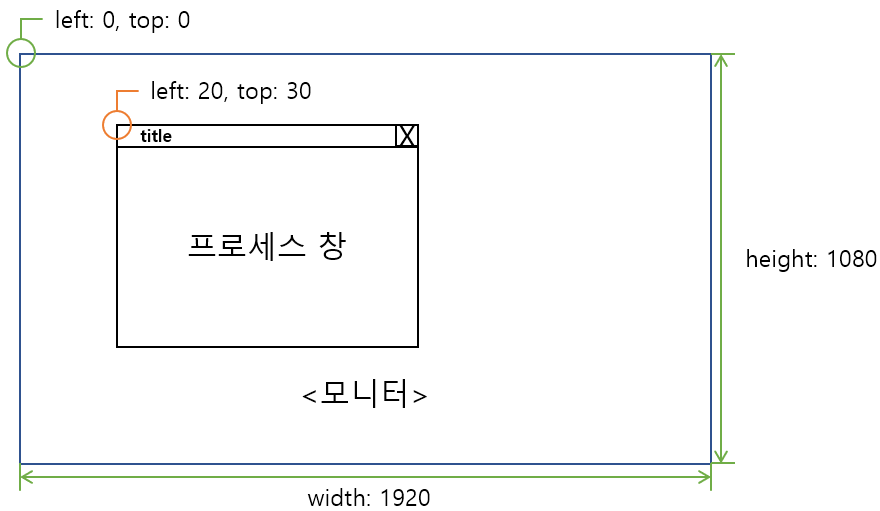
**&lt;Windows 모니터 및 프로세스 창 해상도 식별 방식&gt;**

**호출예시**

```json
{
  "service": "WinInfo.SetWindowPosition",
  "requestKey": "Random Request Key",
  "param": { 
    "processTitle": "TOMATOSYSTEM",
    "screenIndex": 1,
    "screenSizeMode": 1,
    "left": 0,
    "top": 0,
    "width": 900,
    "height": 800
  }
}

```

- processTitle 
    - 검색할 프로세스 창의 타이틀.
- screenIndex 
    - 프로세스 창을 이동 시킬 모니터 인덱스
    - 시스템이 인식하는 모니터 명칭에서 숫자 값. (예: DISPLAY4 → 4)
- screenSizeMode: 창의 표시 상태. 
    - 1: 일반 모드 (left, top, width, height 지정 가능)
    - 2: 창 최대화 (left, top, width, height 지정 불가)
    - 3: 창 최소화 (left, top, width, height 지정 불가)
- left 
    - 창을 이동 시킬 좌측 좌표 값.
    - 창을 이동 시킬 모니터의 left ~ (left + 모니터 width) 범위 내의 값을 입력.
    - screenSizeMode가 2 또는 3인 경우 0 입력.
- top 
    - 창을 이동 시킬 상단 좌표 값.
    - 창을 이동 시킬 모니터의 top ~ (top + 모니터 height) 범위 내의 값을 입력.
    - screenSizeMode가 2 또는 3인 경우 0 입력.
- width 
    - 창의 가로 길이.
- height 
    - 창의 세로 길이.

**응답예시**

```json
{
  "service":"WinInfo.SetWindowPosition",
  "requestKey":"호출시 사용한 Request Key",
  "statusCode":"0000",
  "return":0
}
```

- return 
    - 서비스 상태 코드.

## 4. 타이틀 기반 특정 프로세스 창 최상단 배치

**API명**

- WinInfo.BringWindowToTop

**정의**

- 특정 타이틀을 가지는 프로세스의 창(Window)을 모든 창 중 가장 최상단으로 위치 시킵니다.

**호출예시**

```json
{
  "service": "WinInfo.BringWindowToTop",
  "requestKey": "Random Request Key",
  "param": { 
    "processTitle": "TOMATOSYSTEM"
  }
}
```

- processTitle 
    - 검색할 프로세스의 타이틀.

**응답예시**

```json
{
  "service":"WinInfo.BringWindowToTop",
  "requestKey":"호출시 사용한 Request Key",
  "statusCode":"0000",
  "return":0
}
```

## 5. PID 기반 특정 프로세스 창 이동

**API명**

- WinInfo.SetProcessWindowPosition

**정의**

- 특정 프로세스 ID(PID)를 가지는 프로세스의 창(Window)을 특정 모니터의 특정 좌표(left, top)으로 이동합니다.

<p class="callout success">모니터와 관련된 정보는 *"모니터 관련 서비스"* 문서를 참고하시길 바랍니다.</p>

**설명**

- 시스템은 모니터와, 프로세스 창의 좌표 및 해상도를 다음과 같이 식별합니다.

[![K-018.png](https://bookstack.tomatosystem.co.kr/uploads/images/gallery/2025-12/scaled-1680-/k-018.png)](https://bookstack.tomatosystem.co.kr/uploads/images/gallery/2025-12/k-018.png)

**&lt;Windows 모니터 및 프로세스 창 해상도 식별 방식&gt;**

**호출예시**

```json
{
  "service": "WinInfo.SetProcessWindowPosition",
  "requestKey": "Random Request Key",
  "param": { 
    "processId": "28700",
    "screenIndex": 1,
    "screenSizeMode": 1,
    "left": 0,
    "top": 0,
    "width": 900,
    "height": 800
  }
}

```

- processId 
    - 검색할 프로세스 ID.
- screenIndex 
    - 프로세스 창을 이동 시킬 모니터 인덱스
    - 시스템이 인식하는 모니터 명칭에서 숫자 값. (예: DISPLAY4 → 4)
- screenSizeMode: 창의 표시 상태. 
    - 1: 일반 모드 (left, top, width, height 지정 가능)
    - 2: 창 최대화 (left, top, width, height 지정 불가)
    - 3: 창 최소화 (left, top, width, height 지정 불가)
- left 
    - 창을 이동 시킬 좌측 좌표 값.
    - 창을 이동 시킬 모니터의 left ~ (left + 모니터 width) 범위 내의 값을 입력.
    - screenSizeMode가 2 또는 3인 경우 0 입력.
- top 
    - 창을 이동 시킬 상단 좌표 값.
    - 창을 이동 시킬 모니터의 top ~ (top + 모니터 height) 범위 내의 값을 입력.
    - screenSizeMode가 2 또는 3인 경우 0 입력.
- width 
    - 창의 가로 길이.
- height 
    - 창의 세로 길이.

**응답예시**

```json
{
  "service":"WinInfo.SetProcessWindowPosition",
  "requestKey":"호출시 사용한 Request Key",
  "statusCode":"0000",
  "return":0
}
```

- return 
    - 서비스 상태 코드.

## 6. 프로세스 IME 모드 변경

**API명**

- WinInfo.SetImeMode

**정의**

- 대상 프로세스의 IME 모드를 변경한다.
- 현재 테스트를 위해 다음 브라우저만 허용. 
    - "chrome", "msedge", "whale", "firefox", "iexplore", "opera"
- IME Mode는 입력 가능한 입력기(textbox, textarea 등)에 focus가 가 있어야 변경 가능하다.

**호출예시**

```json
{
  "service": "WinInfo.SetImeMode",
  "requestKey": "Random Request Key",
  "param": { 
    "toNative": true
  }
}
```

- toNative: IME 입력기에 설정된 원어로 변경할지 여부. (ex. 한국어 입력기에서 원어: "한글") 
    - true: 원어로 설정한다.
    - false: 영어로 설정한다.

**응답예시**

```json
{
  "service":"WinInfo.SetImeMode",
  "requestKey":"호출시 사용한 Request Key",
  "statusCode":"0000",
  "return":0
}
```

- return 
    - 서비스 상태 코드.

## 7. 프로세스 IME 모드 획득

**API명**

- WinInfo.GetImeMode

**정의**

- 대상 프로세스에 현재 설정된 IME 모드를 획득한다.
- 현재 테스트를 위해 다음 브라우저만 허용. 
    - "chrome", "msedge", "whale", "firefox", "iexplore", "opera"
- IME Mode는 입력 가능한 입력기(textbox, textarea 등)에 focus가 가 있어야 획득 가능하다.

**호출예시**

```json
{
  "service": "WinInfo.GetImeMode",
  "requestKey": "Random Request Key",
  "param": {}
}
```

**응답예시**

```json
{
  "service":"WinInfo.GetImeMode",
  "requestKey":"호출시 사용한 Request Key",
  "statusCode":"0000",
  "return":{
    "returnValue":0,
    "isNative":true
  }
}
```

- return 
    - 서비스 상태 코드.
- isNative: IME 입력기에 설정된 언어 정보. (ex. 한국어 입력기에서 원어: "한글") 
    - true: 원어로 설정되어 있음.
    - false: 영어로 설정되어 있음.

# 스크린샷 관련 서비스

 특정 모니터 또는 특정 프로세스 창의 스크린샷을 획득 또는 저장하기 위한 기능들을 제공합니다.

 본 서비스에서 eXDevice+가 인식하는 프로세스의 창 영역은 다음과 같습니다.

[![image.png](https://bookstack.tomatosystem.co.kr/uploads/images/gallery/2025-12/scaled-1680-/09Timage.png)](https://bookstack.tomatosystem.co.kr/uploads/images/gallery/2025-12/09Timage.png)
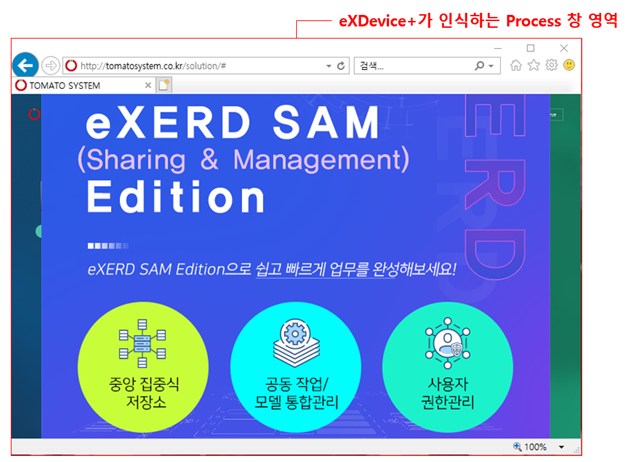
**&lt;eXDevice+가 인식하는 프로세스 창 영역&gt;**

 또한 웹 브라우저의 경우 Windows 정책 상 현재 포커스 된 창의 포커스 된 탭의 타이틀만 식별할 수 있습니다. 즉, 특정 브라우저에 포커스가 가 있지 않은 경우 해당 브라우저의 마지막으로 오픈한 창의 오픈된 탭의 타이틀을 검색할 수 있습니다.

[![image.png](https://bookstack.tomatosystem.co.kr/uploads/images/gallery/2025-12/scaled-1680-/qJYimage.png)](https://bookstack.tomatosystem.co.kr/uploads/images/gallery/2025-12/qJYimage.png)
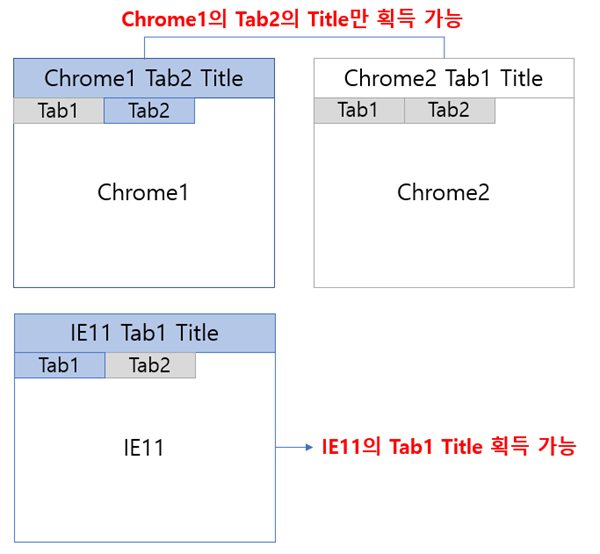
**&lt;eXDevice+ 브라우저 타이틀 인식 예시&gt;**

## 서비스 리스트

 스크린샷 관련 서비스 리스트는 다음과 같습니다.

<table border="1" id="bkmrk-no.-%EC%84%9C%EB%B9%84%EC%8A%A4%EB%AA%85-api%EB%AA%85-%EB%B9%84%EA%B3%A0-1-c" style="border-collapse: collapse; width: 100%; height: 218.578px;"><colgroup><col style="width: 7.03218%;"></col><col style="width: 28.9631%;"></col><col style="width: 33.975%;"></col><col style="width: 30.0298%;"></col></colgroup><thead><tr style="height: 29.7969px;"><td class="align-center" style="height: 29.7969px;">**No.**</td><td class="align-center" style="height: 29.7969px;">**서비스명**</td><td class="align-center" style="height: 29.7969px;">**API명**</td><td class="align-center" style="height: 29.7969px;">비고</td></tr></thead><tbody><tr style="height: 29.7969px;"><td class="align-center" style="height: 29.7969px;">1</td><td style="height: 29.7969px;">모니터 스크린샷 획득</td><td style="height: 29.7969px;">WinInfo.GetScreenShot</td><td style="height: 29.7969px;"> </td></tr><tr style="height: 29.7969px;"><td class="align-center" style="height: 29.7969px;">2</td><td style="height: 29.7969px;">모니터 스크린샷 저장</td><td style="height: 29.7969px;">WinInfo.SaveScreenShot</td><td style="height: 29.7969px;"> </td></tr><tr style="height: 29.7969px;"><td class="align-center" style="height: 29.7969px;">3</td><td style="height: 29.7969px;">타이틀 기반 프로세스 창 스크린샷 획득</td><td style="height: 29.7969px;">WinInfo.GetWindowScreenShot</td><td style="height: 29.7969px;"> </td></tr><tr style="height: 10px;"><td class="align-center" style="height: 10px;">4</td><td style="height: 10px;">타이틀 기반 프로세스 창 스크린샷 저장</td><td style="height: 10px;">WinInfo.SaveWindowScreenShot</td><td style="height: 10px;"> </td></tr></tbody></table>

## 서비스 상태 코드 리스트

 본 서비스에서 공통으로 사용되는 서비스 상태코드 리스트에 대해 정의합니다.

 이 상태 코드는 응답 JSON 메시지 중 *return* 또는 *returnValue*의 값에 해당합니다.

<table border="1" id="bkmrk-%EB%A6%AC%ED%84%B4%EC%BD%94%EB%93%9C-%EB%A6%AC%ED%84%B4-%EC%BD%94%EB%93%9C-%EB%82%B4%EC%9A%A9-%EB%8C%80%EC%83%81-%EC%84%9C%EB%B9%84%EC%8A%A4" style="border-collapse: collapse; width: 100%; height: 218.578px;"><colgroup><col style="width: 8.69876%;"></col><col style="width: 36.4718%;"></col><col style="width: 31.9267%;"></col><col style="width: 22.9981%;"></col></colgroup><thead><tr style="height: 29.7969px;"><td class="align-center" style="height: 29.7969px;">**리턴코드**</td><td class="align-center" style="height: 29.7969px;">**리턴 코드 내용**</td><td class="align-center" style="height: 29.7969px;">**대상 서비스**</td><td class="align-center" style="height: 29.7969px;">**비고**</td></tr></thead><tbody><tr style="height: 29.7969px;"><td class="align-center" style="height: 29.7969px;">-1</td><td style="height: 29.7969px;">정의되지 않은 예외</td><td style="height: 29.7969px;">공통</td><td style="height: 29.7969px;">Log 파일에서 내용 확인 필요</td></tr><tr style="height: 29.7969px;"><td class="align-center" style="height: 29.7969px;">0</td><td style="height: 29.7969px;">정상</td><td style="height: 29.7969px;">공통</td><td style="height: 29.7969px;">-</td></tr><tr style="height: 29.7969px;"><td class="align-center" style="height: 29.7969px;">2</td><td style="height: 29.7969px;">PC와 연결된 모니터 리스트 획득 실패</td><td style="height: 29.7969px;">GetScreenShot,

SaveScreenShot

</td><td style="height: 29.7969px;"> </td></tr><tr style="height: 10px;"><td class="align-center" style="height: 10px;">3</td><td style="height: 10px;">요청 모니터 정보 획득 실패</td><td style="height: 10px;">GetScreenShot,

SaveScreenShot

</td><td style="height: 10px;"> </td></tr><tr style="height: 29.7969px;"><td class="align-center" style="height: 29.7969px;">6</td><td style="height: 29.7969px;">대상 타이틀을 가진 프로세스가 없음</td><td style="height: 29.7969px;">GetWindowScreenShot,

SaveWindowScreenShot,

GetProcessScreenShot,

SaveProcessScreenShot

</td><td style="height: 29.7969px;"> </td></tr><tr><td class="align-center">10</td><td>창 최소화 모드에서 스크린샷 획득 불가</td><td>GetWindowScreenShot,

SaveWindowScreenShot,

GetProcessScreenShot,

SaveProcessScreenShot

</td><td>  
</td></tr><tr><td class="align-center">11</td><td>스크린샷 획득 실패</td><td>GetWindowScreenShot,

SaveWindowScreenShot,

GetProcessScreenShot,

SaveProcessScreenShot

</td><td>  
</td></tr><tr style="height: 29.7969px;"><td class="align-center" style="height: 29.7969px;">12</td><td style="height: 29.7969px;">파일 저장 실패</td><td style="height: 29.7969px;">SaveScreenShot,

SaveWindowScreenShot,

SaveProcessScreenShot

</td><td style="height: 29.7969px;"> </td></tr></tbody></table>

## 1. 모니터 스크린샷 획득

**API명**

- WinInfo.GetScreenShot

**정의**

- 지정한 모니터의 화면을 캡처하고, 캡처한 이미지를 Base64 String으로 획득합니다.

<p class="callout success">모니터와 관련된 정보는 *"모니터 관련 서비스"* 문서를 참고하시길 바랍니다.</p>

**호출예시**

```json
{
  "service":"WinInfo.GetScreenShot",
  "requestKey":"Random Request Key",
  "param":{ 
    "screenIndex": 4
  }
}
```

- screenIndex 
    - 화면을 캡처할 모니터 인덱스.
    - 시스템이 인식하는 모니터 명칭에서 숫자 값. (예: DISPLAY4 → 4)

**응답예시**

```json
{
  "service":"WinInfo.GetScreenShot",
  "requestKey":"호출시 사용한 Request Key",
  "statusCode":"0000",
  "return":{
    "returnValue":0,
    "screenShotBase64":"/9j/4AAQSkZJRgABAQEAYABgAAD/2wBDAAMCAgMCAgMDAwMEA..."
  }
}
```

- returnValue 
    - 서비스 상태 코드.
- screenShotBase64 
    - Base64 String 데이터로 인코딩 된 모니터 스크린샷 데이터.

## 2. 모니터 스크린샷 저장

**API명**

- WinInfo.SaveScreenShot

**정의**

- 지정한 모니터의 화면을 캡처하고, 캡처한 이미지를 로컬 디스크에 저장합니다.

<p class="callout success">모니터와 관련된 정보는 *"모니터 관련 서비스"* 문서를 참고하시길 바랍니다.</p>

호출예시

```json
{
  "service": "WinInfo.SaveScreenShot",
  "requestKey": "Random Request Key",
  "param": { 
    "screenIndex": 4,
    "filePath": "D:\\test.jpg"
  }
}
```

- screenIndex 
    - 화면을 캡처할 모니터 인덱스.
    - 시스템이 인식하는 모니터 명칭에서 숫자 값. (예: DISPLAY4 → 4)
- filePath 
    - 스크린샷을 저장할 로컬 파일 경로.

**응답예시**

```json
{
  "service":"WinInfo.SaveScreenShot",
  "requestKey":"호출시 사용한 Request Key",
  "statusCode":"0000",
  "return":0
}
```

- return 
    - 서비스 상태 코드.

## 3. 타이틀 기반 프로세스 창 스크린샷 획득

**API명**

- WinInfo.GetWindowScreenShot

**정의**

- 타이틀을 가지는 프로세스의 창(Window)을 찾고, 해당 창을 캡쳐한 이미지를 Base64 String으로 획득합니다.

<p class="callout warning">프로세스의 창이 최소화 모드인 경우 해당 창의 스크린샷을 획득할 수 없습니다.</p>

**호출예시**

```json
{
  "service":"WinInfo.GetWindowScreenShot",
  "requestKey":"Random Request Key",
  "param": {
    "processTitle":"TOMATOSYSTEM"
  }
}
```

- processTitle 
    - 캡쳐할 프로세스 창의 타이틀.

**응답예시**

```json
{
  "service":"WinInfo.GetWindowScreenShot",
  "requestKey":"호출시 사용한 Request Key",
  "statusCode":"0000",
  "return":{
    "returnValue":0,
    "screenShotBase64":"/9j/4AAQSkZJRgABAQEAYABgAAD/2wBDAA..."
  }
}
```

- returnValue 
    - 서비스 상태 코드.
- screenShotBase64 
    - Base64 String 데이터로 인코딩 된 프로세스 창 스크린샷 데이터.

## 4. 타이틀 기반 프로세스 창 스크린샷 저장

**API명**

- WinInfo.SaveWindowScreenShot

**정의**

- 타이틀을 가지는 프로세스의 창(Window)을 찾고, 해당 창을 캡처한 이미지를 로컬 디스크에 저장합니다.

<p class="callout warning">프로세스의 창이 최소화 모드인 경우 해당 창의 스크린샷을 획득할 수 없습니다.</p>

**호출예시**

```json
{
  "service":"WinInfo.SaveWindowScreenShot",
  "requestKey":"Random Request Key...",
  "param":{
    "processTitle":"TOMATOSYSTEM",
    "filePath":"C:\\test.jpg"
  }
}
```

- processTitle 
    - 캡쳐할 프로세스 창의 타이틀.
- filePath 
    - 스크린샷을 저장할 로컬 파일 경로.

**응답예시**

```json
{
  "service":"WinInfo.SaveWindowScreenShot",
  "requestKey":"호출시 사용한 Request Key",
  "statusCode":"0000",
  "return":0
}
```

- return 
    - 서비스 상태 코드.

## 5. PID 기반 프로세스 창 스크린샷 획득

**API명**

- WinInfo.GetProcessScreenShot

**정의**

- 특정 프로세스 ID(PID)를 가지는 프로세스 창(Window)을 찾고, 해당 창을 캡쳐한 이미지를 Base64 String으로 획득합니다.

<p class="callout warning">프로세스의 창이 최소화 모드인 경우 해당 창의 스크린샷을 획득할 수 없습니다.</p>

**호출예시**

```json
{
  "service":"WinInfo.GetProcessScreenShot",
  "requestKey":"Random Request Key",
  "param":{
    "processId":1234
  }
}
```

- processId 
    - 검색할 프로세스 ID.

**응답예시**

```json
{
  "service":"WinInfo.GetProcessScreenShot",
  "requestKey":"호출시 사용한 Request Key",
  "statusCode":"0000",
  "return":{
    "returnValue":0,
    "screenShotBase64":"/9j/4AAQSkZJRgABAQEAYABgAAD/2w..."
  }
}
```

- returnValue 
    - 서비스 상태 코드.
- screenShotBase64 
    - Base64 String 데이터로 인코딩 된 프로세스 창 스크린샷 데이터.

## 6. PID 기반 프로세스 창 스크린샷 저장

**API명**

- WinInfo.SaveWindowScreenShot

**정의**

- 특정 프로세스 ID(PID)를 가지는 프로세스 창(Window)을 찾고, 해당 창을 캡쳐한 이미지를 로컬 디스크에 저장합니다.

**호출예시**

```json
{
  "service":"WinInfo.SaveProcessScreenShot",
  "requestKey":"Random Request Key",
  "param":{
    "processId":1234,
    "filePath":"C:\\test.jpg"
  }
}
```

- processId 
    - 검색할 프로세스 ID.
- filePath 
    - 스크린샷을 저장할 로컬 경로.

**응답예시**

```json
{
  "service":"WinInfo.SaveProcessScreenShot",
  "requestKey":"호출시 사용한 Request Key",
  "statusCode":"0000",
  "return":0
}
```

- return 
    - 서비스 상태 코드.

# 파일 관련 서비스

 로컬 파일을 Create, Read, Write, Copy, Delete 등 로컬 파일을 제어하는 기능들을 제공합니다.

## 서비스 리스트

<table border="1" id="bkmrk-no.-%EC%84%9C%EB%B9%84%EC%8A%A4%EB%AA%85-api%EB%AA%85-%EB%B9%84%EA%B3%A0-1-c" style="border-collapse: collapse; width: 100%; height: 357.563px;"><colgroup><col style="width: 7.03218%;"></col><col style="width: 28.9631%;"></col><col style="width: 33.975%;"></col><col style="width: 30.0298%;"></col></colgroup><thead><tr style="height: 29.7969px;"><td class="align-center" style="height: 29.7969px;">**No.**</td><td class="align-center" style="height: 29.7969px;">**서비스명**</td><td class="align-center" style="height: 29.7969px;">**API명**</td><td class="align-center" style="height: 29.7969px;">비고</td></tr></thead><tbody><tr style="height: 29.7969px;"><td class="align-center" style="height: 29.7969px;"><span style="color: rgb(0, 0, 0);">1</span></td><td style="height: 29.7969px;"><span style="color: rgb(0, 0, 0);">파일 open</span></td><td style="height: 29.7969px;"><span style="color: rgb(0, 0, 0);">WinInfo.OpenFile</span></td><td style="height: 29.7969px;"> </td></tr><tr style="height: 29.7969px;"><td class="align-center" style="height: 29.7969px;">2</td><td style="height: 29.7969px;">파일 read</td><td style="height: 29.7969px;">WinInfo.ReadFile</td><td style="height: 29.7969px;"> </td></tr><tr style="height: 29.7969px;"><td class="align-center" style="height: 29.7969px;">3</td><td style="height: 29.7969px;">파일 write</td><td style="height: 29.7969px;">WinInfo.WriteFile</td><td style="height: 29.7969px;"> </td></tr><tr style="height: 29.7969px;"><td class="align-center" style="height: 29.7969px;">4</td><td style="height: 29.7969px;">파일 delete</td><td style="height: 29.7969px;">WinInfo.DeleteFile</td><td style="height: 29.7969px;">  
</td></tr><tr style="height: 29.7969px;"><td class="align-center" style="height: 29.7969px;">5</td><td style="height: 29.7969px;">파일 copy</td><td style="height: 29.7969px;">WinInfo.CopyFile</td><td style="height: 29.7969px;">  
</td></tr><tr><td class="align-center">6</td><td>파일 실행</td><td>WinInfo.RunFile</td><td>시스템 환경변수 호환되는 API</td></tr><tr style="height: 29.7969px;"><td class="align-center" style="height: 29.7969px;">7</td><td style="height: 29.7969px;">디렉토리 open</td><td style="height: 29.7969px;">WinInfo.OpenDirectory</td><td style="height: 29.7969px;">  
</td></tr><tr style="height: 29.7969px;"><td class="align-center" style="height: 29.7969px;">8</td><td style="height: 29.7969px;">파일 open dialog</td><td style="height: 29.7969px;">WinInfo.FileOpenDialog</td><td style="height: 29.7969px;">  
</td></tr><tr style="height: 29.7969px;"><td class="align-center" style="height: 29.7969px;">9</td><td style="height: 29.7969px;">파일 read dialog</td><td style="height: 29.7969px;">WinInfo.FileReadDialog</td><td style="height: 29.7969px;">  
</td></tr><tr style="height: 29.7969px;"><td class="align-center" style="height: 29.7969px;">10</td><td style="height: 29.7969px;">파일 write dialog</td><td style="height: 29.7969px;">WinInfo.FileWriteDialog</td><td style="height: 29.7969px;">  
</td></tr><tr style="height: 29.7969px;"><td class="align-center" style="height: 29.7969px;">11</td><td style="height: 29.7969px;">파일 리스트 획득</td><td style="height: 29.7969px;">WinInfo.GetFileList</td><td style="height: 29.7969px;">  
</td></tr><tr><td class="align-center">12</td><td>바로가기 생성</td><td>WinInfo.CreateShortcut</td><td>  
</td></tr></tbody></table>

## 서비스 상태 코드 리스트

본 서비스에서 공통으로 사용되는 서비스 상태코드 리스트에 대해 정의합니다.

 이 상태 코드는 응답 JSON 메시지 중 *return* 또는 *returnValue*의 값에 해당합니다.

<table border="1" id="bkmrk-%EB%A6%AC%ED%84%B4%EC%BD%94%EB%93%9C-%EB%A6%AC%ED%84%B4-%EC%BD%94%EB%93%9C-%EB%82%B4%EC%9A%A9-%EB%8C%80%EC%83%81-%EC%84%9C%EB%B9%84%EC%8A%A4" style="border-collapse: collapse; width: 100%; height: 225.375px;"><colgroup><col style="width: 8.70083%;"></col><col style="width: 35.3993%;"></col><col style="width: 31.9441%;"></col><col style="width: 24.075%;"></col></colgroup><thead><tr style="height: 29.7969px;"><td class="align-center" style="height: 29.7969px;">**리턴코드**</td><td class="align-center" style="height: 29.7969px;">**리턴 코드 내용**</td><td class="align-center" style="height: 29.7969px;">**대상 서비스**</td><td class="align-center" style="height: 29.7969px;">**비고**</td></tr></thead><tbody><tr style="height: 29.7969px;"><td class="align-center" style="height: 29.7969px;">-1</td><td style="height: 29.7969px;">정의되지 않은 예외</td><td style="height: 29.7969px;">공통</td><td style="height: 29.7969px;">Log 파일에서 내용 확인 필요</td></tr><tr style="height: 29.7969px;"><td class="align-center" style="height: 29.7969px;">0</td><td style="height: 29.7969px;">정상</td><td style="height: 29.7969px;">공통</td><td style="height: 29.7969px;">-</td></tr><tr style="height: 46.5938px;"><td class="align-center" style="height: 46.5938px;">9</td><td style="height: 46.5938px;">해당 경로에 파일/디렉토리가 존재하지 않음</td><td style="height: 46.5938px;">OpenFile, ReadFile, DeleteFile, CopyFile, OpenDirectory, GetFileList</td><td style="height: 46.5938px;">-</td></tr><tr style="height: 29.7969px;"><td class="align-center" style="height: 29.7969px;">14</td><td style="height: 29.7969px;">해당 경로에 동일한 파일이 존재</td><td style="height: 29.7969px;">WriteFile, CopyFile, WinInfo.CreateShortcut</td><td style="height: 29.7969px;">fileWriteMode가 0인 경우</td></tr><tr style="height: 29.7969px;"><td class="align-center" style="height: 29.7969px;">15</td><td style="height: 29.7969px;">사용자에 의한 취소</td><td style="height: 29.7969px;">FileOpenDialog, FileReadDialog,

FileWriteDialog

</td><td style="height: 29.7969px;">dialog 닫기/취소 클릭한 경우</td></tr><tr style="height: 29.7969px;"><td class="align-center" style="height: 29.7969px;">98</td><td style="height: 29.7969px;">유효하지 않은 파라미터</td><td style="height: 29.7969px;">공통

</td><td style="height: 29.7969px;">-</td></tr></tbody></table>

## 1. 파일 open

**API명**

- WinInfo.OpenFile

**정의**

- 특정 로컬 경로의 파일을 open합니다.

<p class="callout info">본 API는 "Calc.exe", "msedge.exe"와 같은 환경변수는 호환되지 않으며, 오로지 절대 경로의 파일을 오픈할 때 사용합니다. 환경변수로 파일을 오픈하려면 "11. 파일 open(환경변수 호환)"을 확인해주세요.</p>

**호출예시**

```json
{
  "service": "WinInfo.OpenFile",
  "requestKey": "Random Request Key",
  "param": { 
    "filePath": "D:\\test.exe",
    "args": "-q"
  }
}
```

- filePath 
    - open할 로컬 파일 경로.
- args 
    - 파일 open시 전달할 arguments.

**응답예시**

```json
{
  "service":"WinInfo.OpenFile",
  "requestKey":"호출시 사용한 Request Key",
  "statusCode":"0000",
  "return":0
}
```

- return 
    - 서비스 상태 코드.

## 2. 파일 read

**API명**

- WinInfo.ReadFile

**정의**

- 로컬 경로의 파일을 read하고, 지정한 파일 포맷으로 파일의 데이터를 획득합니다.
- 이때, 파일 read 시작 시간 및 종료 시간을 획득할 수 있습니다.

**호출예시**

```json
{
  "service":"WinInfo.ReadFile",
  "requestKey":"Random Request Key",
  "param": { 
    "filePath": "D:\\test.txt",
    "fileEncodingType":"UTF-8",
    "timeFormat": 0
  }
}
```

- filePath 
    - read할 파일 경로.
- fileEncodingType: 파일 인코딩 타입. 
    - 미 지정: UTF-8
    - 지원 타입: <span lang="EN-US" style="font-size: 10.0pt; mso-bidi-font-size: 11.0pt; font-family: '맑은 고딕'; mso-hansi-font-family: 굴림; mso-bidi-font-family: 'Times New Roman'; mso-font-kerning: 1.0pt; mso-ansi-language: EN-US; mso-fareast-language: KO; mso-bidi-language: AR-SA;">UTF-8, UTF-8 Byte Order Mark, UTF-16, UTF-16 Big Endian, UTF-32, ANSI, ASCII, BASE64</span>
- <span lang="EN-US" style="font-size: 10.0pt; mso-bidi-font-size: 11.0pt; font-family: '맑은 고딕'; mso-hansi-font-family: 굴림; mso-bidi-font-family: 'Times New Roman'; mso-font-kerning: 1.0pt; mso-ansi-language: EN-US; mso-fareast-language: KO; mso-bidi-language: AR-SA;">timeFormat: 파일 read시 걸린 시간을 측정하기 위한 시간 포맷.</span>
    - <span lang="EN-US" style="font-size: 10.0pt; mso-bidi-font-size: 11.0pt; font-family: '맑은 고딕'; mso-hansi-font-family: 굴림; mso-bidi-font-family: 'Times New Roman'; mso-font-kerning: 1.0pt; mso-ansi-language: EN-US; mso-fareast-language: KO; mso-bidi-language: AR-SA;">0: Unix Epoch (UTC <span style="font-size: 10.0pt; mso-bidi-font-size: 11.0pt; font-family: '맑은 고딕'; mso-hansi-font-family: 굴림; mso-bidi-font-family: 'Times New Roman'; mso-font-kerning: 1.0pt; mso-ansi-language: EN-US; mso-fareast-language: KO; mso-bidi-language: AR-SA;">기준 <span lang="EN-US">ms </span>단위 숫자<span lang="EN-US">)</span></span></span>
    - <span lang="EN-US" style="font-size: 10.0pt; mso-bidi-font-size: 11.0pt; font-family: '맑은 고딕'; mso-hansi-font-family: 굴림; mso-bidi-font-family: 'Times New Roman'; mso-font-kerning: 1.0pt; mso-ansi-language: EN-US; mso-fareast-language: KO; mso-bidi-language: AR-SA;"><span style="font-size: 10.0pt; mso-bidi-font-size: 11.0pt; font-family: '맑은 고딕'; mso-hansi-font-family: 굴림; mso-bidi-font-family: 'Times New Roman'; mso-font-kerning: 1.0pt; mso-ansi-language: EN-US; mso-fareast-language: KO; mso-bidi-language: AR-SA;">1: ISO 8601 (UTC 표준<span lang="EN-US">: 2025-08-19T08:22:34.123Z)</span></span></span>

**응답예시**

```json
{
  "service":"WinInfo.ReadFile",
  "requestKey":"호출시 사용한 Request Key",
  "statusCode":"0000",
  "return":{
    "returnValue":0,
    "data":"읽어들인 파일 내용",
    "startTime":"1765346851091",
    "endTime":"1765346851091"
  }
}
```

- returnValue 
    - 서비스 상태 코드.
- data 
    - 읽어들인 파일 내용.
- startTime 
    - 파일 read 시작 시간.
- endTime 
    - 파일 read 종료 시간.

## 3. 파일 write

**API명**

- WinInfo.WriteFile

**정의**

- 로컬 경로에 특정 파일을 생성하고, 파일의 내용을 지정한 문자열로 작성합니다.

**호출예시**

```json
{
  "service":"WinInfo.WriteFile",
  "requestKey":"Random Request Key",
  "param":{
    "filePath": "D:\\test.csv",
    "fileWriteMode": 0
    "data": "사번,이름,부서,직책,이메일,입사일,재직상태...",
    "timeFormat": 0
  }
}
```

- filePath 
    - 파일 write할 로컬 경로.
- fileWriteMode: 파일 write 모드. 
    - 0: 파일이 존재하지 않을 경우 파일 생성.
    - 1: 파일이 존재하는 경우 덮어 쓰기. (기존 내용 삭제됨)
    - 2: 파일이 존재하는 경우 이어쓰기
- data 
    - 파일에 write할 데이터.
- timeFormat: 파일 write시 걸린 시간을 측정하기 위한 시간 포맷.  
    
    - <span lang="EN-US" style="font-size: 10.0pt; mso-bidi-font-size: 11.0pt; font-family: '맑은 고딕'; mso-hansi-font-family: 굴림; mso-bidi-font-family: 'Times New Roman'; mso-font-kerning: 1.0pt; mso-ansi-language: EN-US; mso-fareast-language: KO; mso-bidi-language: AR-SA;">0: Unix Epoch (UTC <span style="font-size: 10.0pt; mso-bidi-font-size: 11.0pt; font-family: '맑은 고딕'; mso-hansi-font-family: 굴림; mso-bidi-font-family: 'Times New Roman'; mso-font-kerning: 1.0pt; mso-ansi-language: EN-US; mso-fareast-language: KO; mso-bidi-language: AR-SA;">기준 <span lang="EN-US">ms </span>단위 숫자<span lang="EN-US">)</span></span></span>
    - <span lang="EN-US" style="font-size: 10.0pt; mso-bidi-font-size: 11.0pt; font-family: '맑은 고딕'; mso-hansi-font-family: 굴림; mso-bidi-font-family: 'Times New Roman'; mso-font-kerning: 1.0pt; mso-ansi-language: EN-US; mso-fareast-language: KO; mso-bidi-language: AR-SA;"><span style="font-size: 10.0pt; mso-bidi-font-size: 11.0pt; font-family: '맑은 고딕'; mso-hansi-font-family: 굴림; mso-bidi-font-family: 'Times New Roman'; mso-font-kerning: 1.0pt; mso-ansi-language: EN-US; mso-fareast-language: KO; mso-bidi-language: AR-SA;">1: ISO 8601 (UTC 표준<span lang="EN-US">: 2025-08-19T08:22:34.123Z)</span></span></span>

**응답예시**

```json
{
  "service":"WinInfo.WriteFile",
  "requestKey":"호출시 사용한 Request Key",
  "statusCode":"0000",
  "return":{
    "returnValue":0,
    "startTime":"1765350096544",
    "endTime":"1765350096547"
  }
}
```

- returnValue 
    - 서비스 상태 코드.
- startTime 
    - 파일 write 시작 시간.
- endTime 
    - 파일 write 종료 시간.

## 4. 파일 delete

**API명**

- WinInfo.DeleteFile

**정의**

- 로컬 경로의 파일을 삭제합니다.

**호출예시**

```json
{
  "service": "WinInfo.DeleteFIle",
  "requestKey": "Random Request Key",
  "param": { 
    "filePath":"D:\\test.csv"
  }
}
```

- filePath 
    - 삭제할 파일 경로.

**응답예시**

```json
{
  "service":"WinInfo.DeleteFile",
  "requestKey":"호출시 사용한 Request Key",
  "statusCode":"0000",
  "return":0
}
```

- return 
    - 서비스 상태 코드.

## 5. 파일 copy

**API명**

- WinInfo.CopyFile

**정의**

- 로컬 파일을 특정 경로에 복사합니다.

**호출예시**

```json
{
  "service": "WinInfo.CopyFile",
  "requestKey": "Random Request Key...",
  "param": { 
    "srcFilePath": "D:\\test.txt",
    "destFilePath": "D:\\test-copy.txt",
    "fileCopyMode": 0
  }
}
```

- srcFilePath 
    - 원본 파일 경로.
- destFilePath 
    - 사본 파일 경로.
- fileCopyMode: 파일 복사 옵션. 
    - 0: 사본 경로에 파일이 존재하지 않는 경우에만 파일 생성
    - 1: 사본 경로에 파일이 존재하는 경우 덮어쓰기. (기존 내용 삭제됨)

**응답예시**

```json
{
  "service":"WinInfo.CopyFile",
  "requestKey":"호출시 사용한 Request Key",
  "statusCode":"0000",
  "return":0
}
```

- return 
    - 서비스 상태 코드.

## 6. 파일 실행

**API명**

- <div><div>WinInfo.runFile</div></div>

**정의**

- 특정 로컬 경로의 파일을 open합니다. (예: C:\\Windows\\system32\\Calc.exe)
- 환경변수로 등록된 파일을 open합니다. (예: Calc.exe)

<p class="callout warning">본 API 호출시 디렉토리 경로를 입력하게 되면, Windows 특성상 파일탐색기로 해당 경로를 오픈하게 되나, 안정성의 이유로 디렉토리 오픈시 "7. 디렉토리 open"을 사용하길 권장합니다.</p>

**호출예시**

```json
{
  "service":"WinInfo.GetFileList",
  "requestKey":"Random Request Key",
  "param":{
    "filePath":"msedge.exe",
    "args": "--app=https://www.tomatosystem.co.kr"
  }
}
```

- filePath 
    - 파일 절대 경로.
    - 환경변수로 설정된 파일 경로.
    - 디렉토리 경로.
- args 
    - 파일 오픈 시 전달할 argument.

**응답예시**

```json
{
  "service":"WinInfo.RunFile",
  "requestKey":"호출시 사용한 Request Key",
  "statusCode":"0000",
  "return":0
}
```

- returnValue 
    - 서비스 상태 코드

## 7. 디렉토리 open

**API명**

- WinInfo.OpenDirectory

**정의**

- 로컬 디렉토리를 파일 탐색기(File explorer)를 사용해 open합니다.

**호출예시**

```json
{
  "service":"WinInfo.OpenDirectory",
  "requestKey":"Random Request Key",
  "param":{
    "dirPath":"D:\\test\\target"
  }
}
```

- dirPath 
    - 오픈 할 디렉토리 경로.

**응답예시**

```json
{
  "service":"WinInfo.OpenDirectory",
  "requestKey":"호출시 사용한 Request Key",
  "statusCode":"0000",
  "return":0
}
```

- return 
    - 서비스 상태 코드.

## 8. 파일 open dialog

**API명**

- WinInfo.FileOpenDialog

**정의**

- 로컬 파일을 실행하기 위해 File open dialog를 띄웁니다.

**호출예시**

```json
{
  "service":"WinInfo.FileOpenDialog",
  "requestKey":"Random Request Key",
  "param":{
    "initDirPath":"D:\\",
    "dialogTitle":"오픈할 파일을 선택하세요",
    "filter":"텍스트|*.txt|JSON|*.json|CSV|*.csv|모든파일|*.*",
    "initFileName":"test.csv",
    "args":""
  }
}
```

- initDirPath 
    - File open dialog가 open 될 때 표시할 디렉토리 경로.
- dialogTitle 
    - File open dialog의 타이틀에 표시할 내용.
- filter 
    - File open dialog에서 사용자가 선택할 수 있는 파일 확장자 필터.
    - "표시할 텍스트|필터링 할 확장자"가 반복되는 형태.
- initFileName 
    - File open dialog가 open 될 때 표시할 파일명.
- args 
    - File open dialog에서 "파일 이름(N)" 텍스트 박스에 표시 될 초기 이름.

**응답예시**

```json
{
  "service":"WinInfo.FileOpenDialog",
  "requestKey":"호출시 사용한 Request Key",
  "statusCode":"0000",
  "return":{
    "returnValue":0,
    "selectedFilePath":"D:\\test.csv"
  }
}
```

- returnValue 
    - 서비스 상태 코드.
- selectedFilePath 
    - 사용자가 선택한 파일 경로.

## 9. 파일 read dialog

**API명**

- WinInfo.FileReadDialog

**정의**

- 로컬 파일의 내용을 읽기 위해 File open dialog를 띄웁니다.

**호출예시**

```json
{
  "service":"WinInfo.FileReadDialog",
  "requestKey":"Random Request Key",
  "param":{
    "initDirPath": "C:\\",
    "dialogTitle": "Read할 파일 선택",
    "filter": "텍스트|*.txt|JSON|*.json|CSV|*.csv|모든파일|*.*",
    "timeFormat": 0
  }
}
```

- initDirPath 
    - File open dialog가 open될 때 표시할 디렉토리 경로.
- dialogTitle 
    - File open dialog의 타이틀에 표시할 내용.
- filter 
    - File open dialog에서 사용자가 선택할 수 있는 파일 확장자 필터.
    - "표시할 텍스트|필터링 할 확장자"가 반복되는 형태.
- fileEncodingType: 파일 인코딩 타입. 
    - 미 지정: UTF-8
    - 지원 타입: <span lang="EN-US" style="font-size: 10.0pt; mso-bidi-font-size: 11.0pt; font-family: '맑은 고딕'; mso-hansi-font-family: 굴림; mso-bidi-font-family: 'Times New Roman'; mso-font-kerning: 1.0pt; mso-ansi-language: EN-US; mso-fareast-language: KO; mso-bidi-language: AR-SA;">UTF-8, UTF-8 Byte Order Mark, UTF-16, UTF-16 Big Endian, UTF-32, ANSI, ASCII, BASE64</span>
- timeFormat 
    - <span lang="EN-US" style="font-size: 10.0pt; mso-bidi-font-size: 11.0pt; font-family: '맑은 고딕'; mso-hansi-font-family: 굴림; mso-bidi-font-family: 'Times New Roman'; mso-font-kerning: 1.0pt; mso-ansi-language: EN-US; mso-fareast-language: KO; mso-bidi-language: AR-SA;">0: Unix Epoch (UTC <span style="font-size: 10.0pt; mso-bidi-font-size: 11.0pt; font-family: '맑은 고딕'; mso-hansi-font-family: 굴림; mso-bidi-font-family: 'Times New Roman'; mso-font-kerning: 1.0pt; mso-ansi-language: EN-US; mso-fareast-language: KO; mso-bidi-language: AR-SA;">기준 <span lang="EN-US">ms </span>단위 숫자<span lang="EN-US">)</span></span></span>
    - <span lang="EN-US" style="font-size: 10.0pt; mso-bidi-font-size: 11.0pt; font-family: '맑은 고딕'; mso-hansi-font-family: 굴림; mso-bidi-font-family: 'Times New Roman'; mso-font-kerning: 1.0pt; mso-ansi-language: EN-US; mso-fareast-language: KO; mso-bidi-language: AR-SA;"><span style="font-size: 10.0pt; mso-bidi-font-size: 11.0pt; font-family: '맑은 고딕'; mso-hansi-font-family: 굴림; mso-bidi-font-family: 'Times New Roman'; mso-font-kerning: 1.0pt; mso-ansi-language: EN-US; mso-fareast-language: KO; mso-bidi-language: AR-SA;">1: ISO 8601 (UTC 표준<span lang="EN-US">: 2025-08-19T08:22:34.123Z)</span></span></span>

**응답예시**

```json
{
  "service":"WinInfo.FileReadDialog",
  "requestKey":"호출시 사용한 Request Key",
  "statusCode":"0000",
  "return":{
    "returnValue":0,
    "selectedFilePath":"D:\\write-test.csv",
    "data":"읽어 들인 파일 내용",
    "startTime":"1765523201801",
    "endTime":"1765523201801"
  }
}
```

- returnValue 
    - 서비스 상태 코드.
- selectedFilePath 
    - 사용자가 선택한 파일 경로.
- data 
    - 읽어 들인 파일 내용.
- startTime 
    - 파일 read시작 시간.
- endTime 
    - 파일 read 종료 시간.

## 10. 파일 write dialog

**API명**

- WinInfo.FileWriteDialog

**정의**

- 로컬 경로에 특정 파일을 생성하고, 파일의 내용을 지정한 문자열로 작성하기 위해 File save dialog를 띄웁니다.

**호출예시**

```json
{
  "service":"WinInfo.FileWriteDialog",
  "requestKey":"Random Request Key",
  "param":{
    "initDirPath":"D:\\",
    "dialogTitle":"파일 저장",
    "filter":"텍스트|*.txt|모든파일|*.*",
    "initFileName":"test.txt",
    "data":"파일에 Write할 데이터",
    "timeFormat":0
  }
}
```

- initDirPath 
    - File save dialog가 open 될 때 표시할 디렉토리 경로.
- dialogTitle 
    - File save dialog의 타이틀에 표시할 내용.
- filter 
    - File open dialog에서 사용자가 선택할 수 있는 파일 확장자 필터.
    - "표시할 텍스트|필터링 할 확장자"가 반복되는 형태.
- initFileName 
    - File save dialog가 open 될 때 표시할 파일명.
- data 
    - 파일에 write할 데이터.
- timeFormat 
    - <span lang="EN-US" style="font-size: 10.0pt; mso-bidi-font-size: 11.0pt; font-family: '맑은 고딕'; mso-hansi-font-family: 굴림; mso-bidi-font-family: 'Times New Roman'; mso-font-kerning: 1.0pt; mso-ansi-language: EN-US; mso-fareast-language: KO; mso-bidi-language: AR-SA;">0: Unix Epoch (UTC <span style="font-size: 10.0pt; mso-bidi-font-size: 11.0pt; font-family: '맑은 고딕'; mso-hansi-font-family: 굴림; mso-bidi-font-family: 'Times New Roman'; mso-font-kerning: 1.0pt; mso-ansi-language: EN-US; mso-fareast-language: KO; mso-bidi-language: AR-SA;">기준 <span lang="EN-US">ms </span>단위 숫자<span lang="EN-US">)</span></span></span>
    - <span lang="EN-US" style="font-size: 10.0pt; mso-bidi-font-size: 11.0pt; font-family: '맑은 고딕'; mso-hansi-font-family: 굴림; mso-bidi-font-family: 'Times New Roman'; mso-font-kerning: 1.0pt; mso-ansi-language: EN-US; mso-fareast-language: KO; mso-bidi-language: AR-SA;"><span style="font-size: 10.0pt; mso-bidi-font-size: 11.0pt; font-family: '맑은 고딕'; mso-hansi-font-family: 굴림; mso-bidi-font-family: 'Times New Roman'; mso-font-kerning: 1.0pt; mso-ansi-language: EN-US; mso-fareast-language: KO; mso-bidi-language: AR-SA;">1: ISO 8601 (UTC 표준<span lang="EN-US">: 2025-08-19T08:22:34.123Z)</span></span></span>

**응답예시**

```json
{
  "service":"WinInfo.FileWriteDialog",
  "requestKey":"호출시 사용한 Request Key",
  "statusCode":"0000",
  "return":{
    "returnValue":0,
    "selectedFilePath":"C:\\test.csv",
    "startTime":"1765524493661",
    "endTime":"1765524493662"
  }
}
```

- returnValue 
    - 서비스 상태 코드.
- selectedFilePath 
    - 사용자가 선택한 파일 경로.
- startTime 
    - 파일 write 시작 시간.
- endTime 
    - 파일 write 종료 시간.

## 11. 파일 리스트 획득

**API명**

- <div><div>WinInfo.GetFileList</div></div>

**정의**

- 지정한 디렉토리에 위치한 모든 파일 리스트를 획득합니다.

**호출예시**

```json
{
  "service":"WinInfo.GetFileList",
  "requestKey":"Random Request Key",
  "param":{
    "dirpath":"D:\\"
  }
}
```

- dirpath 
    - 파일 리스트를 획득할 디렉토리 경로.

**응답예시**

```json
{
  "service":"WinInfo.GetFileList",
  "requestKey":"호출시 사용한 Request Key",
  "statusCode":"0000",
  "return":{
    "returnValue":0,
    "fileNames":["test-copy.txt","test.txt","write-test.csv"]
  }
}
```

- returnValue 
    - 서비스 상태 코드
- fileNames 
    - 지정한 디렉토리에 위치한 파일 이름 배열.

## 12. 바로가기 생성

**API명**

- <div><div>WinInfo.CreateShortcut</div></div>

**정의**

- 지정한 위치에 바로가기(`*.lnk`) 파일을 생성합니다.

**호출예시**

```json
{
  "service":"WinInfo.CreateShortcut",
  "requestKey":"Random Request Key",
  "param":{
    "targetPath":"msedge.exe",
    "arguments":"--app=https://www.tomatosystem.co.kr",
    "shortcutPath":"%USERPROFILE%\\Desktop\\TomatoSystemApp.lnk",
    "fileWriteMode":1,
    "iconPath":"D:\test.ico"
  }
}
```

- targetPath 
    - 원본 파일 의 절대 경로.
    - 환경 변수로 접근 가능한 파일 경로.
- arguments 
    - 바로가기가 실행될 때 주입할 arguments.
- shortcutPath 
    - 바로가기를 생성할 파일 절대 경로.
    - 환경 변수로 접근 가능한 경로 사용 가능.
- fileWriteMode: 파일 write 모드. 
    - 0: 바로가기 파일이 존재하지 않을 경우에만 파일 생성.
    - 1: 바로가기 파일이 존재하는 경우 덮어 쓰기. (기존 내용 삭제됨)
    - <s>2: 바로가기에서는 지원하지 않는 옵션</s>
- iconPath 
    - 바로가기에 적용할 아이콘 경로.
    - 적용하지 않는 경우 바로가기를 연결한 APP의 아이콘으로 대체.

**응답예시**

```json
{
  "service":"WinInfo.CreateShortcut",
  "requestKey":"호출시 사용한 Request Key",
  "statusCode":"0000",
  "return":0
}
```

- return 
    - 서비스 상태 코드

# 프린터 관련 서비스

## 프린터 관련 서비스

로컬 프린터를 조회하거나, 프린터를 조작하는 기능들을 제공합니다.

## 서비스 리스트

<table border="1" id="bkmrk-no.-%EC%84%9C%EB%B9%84%EC%8A%A4%EB%AA%85-api%EB%AA%85-%EB%B9%84%EA%B3%A0-1-c" style="border-collapse: collapse; width: 100%; height: 238.375px;"><colgroup><col style="width: 7.03218%;"></col><col style="width: 28.9631%;"></col><col style="width: 33.975%;"></col><col style="width: 30.0298%;"></col></colgroup><thead><tr style="height: 29.7969px;"><td class="align-center" style="height: 29.7969px;">**No.**</td><td class="align-center" style="height: 29.7969px;">**서비스명**</td><td class="align-center" style="height: 29.7969px;">**API명**</td><td class="align-center" style="height: 29.7969px;">비고</td></tr></thead><tbody><tr style="height: 29.7969px;"><td class="align-center" style="height: 29.7969px;">1</td><td style="height: 29.7969px;">기본 프린터 조회</td><td style="height: 29.7969px;"><div><div>WinInfo.GetDefaultPrinter</div></div></td><td style="height: 29.7969px;"> </td></tr><tr style="height: 29.7969px;"><td class="align-center" style="height: 29.7969px;">2</td><td style="height: 29.7969px;">전체 프린터 조회</td><td style="height: 29.7969px;"><div><div>WinInfo.GetPrinterList</div></div></td><td style="height: 29.7969px;"> </td></tr><tr style="height: 29.7969px;"><td class="align-center" style="height: 29.7969px;">3</td><td style="height: 29.7969px;">기본 프린터 설정</td><td style="height: 29.7969px;"><div><div>WinInfo.SetDefaultPrinter</div></div></td><td style="height: 29.7969px;"> </td></tr><tr style="height: 29.7969px;"><td class="align-center" style="height: 29.7969px;">4</td><td style="height: 29.7969px;">기본 설정 조회</td><td style="height: 29.7969px;"><div><div>WinInfo.GetPrinterDefaultSettings</div></div></td><td style="height: 29.7969px;">default tray, default paper</td></tr><tr style="height: 29.7969px;"><td class="align-center" style="height: 29.7969px;">5</td><td style="height: 29.7969px;">지원 트레이 리스트 조회</td><td style="height: 29.7969px;"><div><div><div><div>WinInfo.GetPrinterTrays</div></div></div></div></td><td style="height: 29.7969px;">  
</td></tr><tr style="height: 29.7969px;"><td class="align-center" style="height: 29.7969px;">6</td><td style="height: 29.7969px;">지원 용지 리스트 조회</td><td style="height: 29.7969px;"><div><div><div><div>WinInfo.GetPrinterPapers</div></div></div></div></td><td style="height: 29.7969px;">  
</td></tr><tr style="height: 29.7969px;"><td class="align-center" style="height: 29.7969px;">7</td><td style="height: 29.7969px;">상세 정보 조회</td><td style="height: 29.7969px;"><div><div><div><div>WinInfo.GetPrinterDetails</div></div></div></div></td><td style="height: 29.7969px;">default settings, tray list, paper list</td></tr></tbody></table>

## 서비스 상태 코드 리스트

본 서비스에서 공통으로 사용되는 서비스 상태코드 리스트에 대해 정의합니다.

이 상태 코드는 응답 JSON 메시지 중 *return* 또는 *returnValue*의 값에 해당합니다.

<table border="1" id="bkmrk-%EB%A6%AC%ED%84%B4%EC%BD%94%EB%93%9C-%EB%A6%AC%ED%84%B4-%EC%BD%94%EB%93%9C-%EB%82%B4%EC%9A%A9-%EB%8C%80%EC%83%81-%EC%84%9C%EB%B9%84%EC%8A%A4" style="border-collapse: collapse; width: 100%; height: 188.781px;"><colgroup><col style="width: 8.70083%;"></col><col style="width: 35.3993%;"></col><col style="width: 31.9441%;"></col><col style="width: 24.075%;"></col></colgroup><thead><tr style="height: 29.7969px;"><td class="align-center" style="height: 29.7969px;">**리턴코드**</td><td class="align-center" style="height: 29.7969px;">**리턴 코드 내용**</td><td class="align-center" style="height: 29.7969px;">**대상 서비스**</td><td class="align-center" style="height: 29.7969px;">**비고**</td></tr></thead><tbody><tr style="height: 29.7969px;"><td class="align-center" style="height: 29.7969px;">-1</td><td style="height: 29.7969px;">정의되지 않은 예외</td><td style="height: 29.7969px;">공통</td><td style="height: 29.7969px;">Log 파일에서 내용 확인 필요</td></tr><tr style="height: 29.7969px;"><td class="align-center" style="height: 29.7969px;">0</td><td style="height: 29.7969px;">정상</td><td style="height: 29.7969px;">공통</td><td style="height: 29.7969px;">-</td></tr><tr style="height: 10px;"><td class="align-center" style="height: 10px;">20</td><td style="height: 10px;">기본 프린터 변경 실패</td><td style="height: 10px;">SetDefaultPrinter</td><td style="height: 10px;">대상 프린터 없음 등</td></tr><tr style="height: 29.7969px;"><td class="align-center" style="height: 29.7969px;">98</td><td style="height: 29.7969px;">유효하지 않은 파라미터</td><td style="height: 29.7969px;">공통

</td><td style="height: 29.7969px;">-</td></tr></tbody></table>

## 기본프린터 조회 방법

Windows는 "프린터 및 스캐너"에서 설정된 기본 프린터를 확인할 수 있으며, 기본 프린터를 확인하기 위해서는 반드시 <span style="color: rgb(0, 0, 0);">**"Windows에서 내 기본 프린터를 관리 할 수 있도록 허용" 옵션을 <span style="color: rgb(224, 45, 45);">꺼야한다</span>**</span>**.**

[![Win11-옵션.png](https://bookstack.tomatosystem.co.kr/uploads/images/gallery/2026-02/scaled-1680-/2zcwin11.png)](https://bookstack.tomatosystem.co.kr/uploads/images/gallery/2026-02/2zcwin11.png)

[![Win11-기본프린터.png](https://bookstack.tomatosystem.co.kr/uploads/images/gallery/2026-02/scaled-1680-/win11.png)](https://bookstack.tomatosystem.co.kr/uploads/images/gallery/2026-02/win11.png)

## 1. 기본 프린터 조회

**API명**

- WinInfo.GetDefaultPrinter

**정의**

- Windows에 기본 프린터로 설정된 프린터의 이름을 획득합니다.

**호출예시**

```json
{
  "service": "WinInfo.GetDefaultPrinter",
  "requestKey": "Random Request Key",
  "param": {}
}
```

**응답예시**

```json
{
  "service":"WinInfo.GetDefaultPrinter",
  "requestKey":"호출시 사용한 Request Key",
  "statusCode":"0000",
  "return":{
    "returnValue":0,
    "name":"FAX"
  }
}
```

- returnValue 
    - 서비스 상태코드.
- name 
    - 현재 Windows에서 기본 프린터로 설정된 프린터 이름.

## 2. 전체 프린터 조회

**API명**

- WinInfo.GetPrinterList

**정의**

- Windows에 등록된 모든 프린터 리스트를 획득하고, 기본프린터 설정 여부를 획득합니다.

**호출예시**

```json
{
  "service": "WinInfo.GetPrinterList",
  "requestKey": "Random Request Key",
  "param": {}
}
```

**응답예시**

```json
{
  "service":"WinInfo.GetPrinterList",
  "requestKey":"호출시 사용한 Request Key",
  "statusCode":"0000",
  "return":{
    "returnValue":0,
    "list":[
      {"name":"OneNote for Windows 10","isDefault":false},
      {"name":"Send To OneNote 2016","isDefault":false},
      {"name":"Microsoft XPS Document Writer","isDefault":false},
      {"name":"Microsoft Print to PDF","isDefault":false},
      {"name":"Fax","isDefault":true}
    ]
  }
}
```

- returnValue 
    - 서비스 상태 코드.
- list: Windows에 등록된 프린터 리스트. 
    - name: 프린터 이름.
    - isDefault: 기본 프린터 여부.

## 3. 기본 프린터 설정

**API명**

- WinInfo.SetDefaultPrinter

**정의**

- 지정한 프린터를 Windows의 기본 프린터로 설정합니다.

**호출예시**

```json
{
  "service":"WinInfo.SetDefaultPrinter",
  "requestKey":"Random Request Key",
  "param":{
    "name":"OneNote for Windows 10"
  }
}
```

- name 
    - Windows 기본 프린터로 설정하고자 하는 프린터 이름.

**응답예시**

```json
{
  "service":"WinInfo.SetDefaultPrinter",
  "requestKey":"호출시 사용한 Request Key",
  "statusCode":"0000",
  "return":0
}
```

## 4. 기본 설정 조회

**API명**

- WinInfo.GetPrinterDefaultSettings

**정의**

- 프린터의 기본 값으로 설정된 트레이 ID와 용지 ID를 획득합니다.

**호출예시**

```json
{
  "service":"WinInfo.GetPrinterDefaultSettings",
  "requestKey":"Random Request Key",
  "param":{
    "name": "FUJIFILM Apeos C2560"
  }
}
```

- name: 프린터 이름

<p class="callout info">프린터의 이름은 "전체 프린터 조회" 기능을 통해 확인할 수 있습니다.</p>

**응답예시**

```json
{
  "service":"WinInfo.GetPrinterDefaultSettings",
  "requestKey":"호출시 사용한 Request Key",
  "statusCode":"0000",
  "return":{
    "returnValue":0,
    "defSettings":{
      "paper":{"width":2100,"height":2970,"kind":9},
      "tray":{"kind":15}
    }
  }
}
```

- returnValue 
    - 서비스 상태 코드.
- defSetting: 프린터 기본 설정 정보. 
    - - paper: 기본 용지 설정. 
            - width: 용지 너비.
            - height: 용지 높이.
            - kind: 용지 식별 넘버.
        - tray: 기본 트레이 설정 
            - kind: 트레이 식별 넘버.

<p class="callout warning">본 서비스는 용지의 이름과 트레이의 이름을 리턴하지 않고 식별ID(Kind)를 리턴합니다. 용지와 트레이 ID로 각각의 이름을 획득하려면 `WinInfo.GetPrinterPapers` 및 `WinInfo.GetPrinterTrays`를 사용하길 바랍니다.</p>

## 5. 지원 트레이 리스트 조회

**API명**

- WinInfo.GetPrinterTrays

**정의**

- 프린터에서 지원하는 트레이 ID와 명칭을 획득합니다.

**호출예시**

```json
{
  "service":"WinInfo.GetPrinterTrays",
  "requestKey":"Random Request Key",
  "param":{
    "name": "FUJIFILM Apeos C2560"
  }
}
```

- name: 프린터 이름

<p class="callout info">프린터의 이름은 "전체 프린터 조회" 기능을 통해 확인할 수 있습니다.</p>

**응답예시**

```json
{
  "service":"WinInfo.GetPrinterTrays",
  "requestKey":"호출시 사용한 Request Key",
  "statusCode":"0000",
  "return":{
    "returnValue":0,
    "trays":[
      {"name":"자동","kind":15},
      {"name":"자동선택","kind":7},
      {"name":"트레이 1","kind":1},
      {"name":"트레이 5(수동)","kind":4}
    ]
  }
}
```

- returnValue 
    - 서비스 상태 코드.
- trays: 프린터 지원 트레이 이름 및 ID 리스트. 
    - name: 트레이 식별 이름.
    - kind: 트레이 식별 ID.

## 6. 지원 용지 리스트 조회

**API명**

- WinInfo.GetPrinterPapers

**정의**

- 프린터에서 지원하는 용지 ID와 명칭을 획득합니다.

**호출예시**

```json
{
  "service":"WinInfo.GetPrinterPapers",
  "requestKey":"Random Request Key",
  "param":{
    "name": "FUJIFILM Apeos C2560"
  }
}
```

- name: 프린터 이름

<p class="callout info">프린터의 이름은 "전체 프린터 조회" 기능을 통해 확인할 수 있습니다.</p>

**응답예시**

```json
{
  "service":"WinInfo.GetPrinterPapers",
  "requestKey":"호출시 사용한 Request Key",
  "statusCode":"0000",
  "return":{
    "returnValue":0,
    "papers":[
      {"name":"A1(594x841mm)","width":594,"height":841,"kind":0},
      {"name":"A2(420x594mm)","width":420,"height":594,"kind":66},
      {"name":"A3(297x420mm)","width":297,"height":420,"kind":8},
      {"name":"B4(257x364mm)","width":257,"height":364,"kind":12},
      {"name":"A4(210x297mm)","width":210,"height":297,"kind":9}
    ]
  }
}
```

- returnValue 
    - 서비스 상태 코드.
- papers: 프린터 지원 용지 이름 및 ID 리스트. 
    - name: 용지 식별 이름.
    - width: 용지 가로 길이. (단위: mm)
    - height: 용지 세로 길이. (단위: mm)
    - kind: 용지식별 ID.

## 7. 상세 정보 조회

**API명**

- WinInfo.GetPrinterDetails

**정의**

- 프린터의 다음 상세 정보를 조회합니다. 
    - 기본 트레이, 용지 설정
    - 지원하는 트레이 리스트
    - 지원하는 용지 리스트

**호출예시**

```json
{
  "service":"WinInfo.GetPrinterDetails",
  "requestKey":"Random Request Key",
  "param":{
    "name": "FUJIFILM Apeos C2560"
  }
}
```

- name: 프린터 이름

<p class="callout info">프린터의 이름은 "전체 프린터 조회" 기능을 통해 확인할 수 있습니다.</p>

**응답예시**

```json
{
  "service":"WinInfo.GetPrinterDetails",
  "requestKey":"호출시 사용한 Request Key",
  "statusCode":"0000",
  "return":{
    "returnValue":0,
    "details":{
      "name":"FUJIFILM Apeos C2560(5층)",
      "isDefault":true,
      "defSettings":{
        "paper":{"name":"A4(210x297mm)","width":210,"height":297,"kind":9},
        "tray":{"name":"자동","kind":15}},
      "trays":[
        {"name":"자동","kind":15},
        {"name":"자동선택","kind":7},
        {"name":"트레이 1","kind":1},
        {"name":"트레이 5(수동)","kind":4}
      ],
      "papers":[
        {"name":"A1(594x841mm)","width":594,"height":841,"kind":0},
        {"name":"A2(420x594mm)","width":420,"height":594,"kind":66},
        {"name":"A3(297x420mm)","width":297,"height":420,"kind":8},
        {"name":"B4(257x364mm)","width":257,"height":364,"kind":12},
        {"name":"A4(210x297mm)","width":210,"height":297,"kind":9}
      ]
    }
  }
}
```

- returnValue 
    - 서비스 상태 코드.
- details: 상세정보. 
    - name: 프린터 이름.
    - isDefault: 기본 프린터 여부.
    - defSettings: 프린터 기본 설정. 
        - paper: 기본 용지 설정. 
            - name: 용지 식별 명칭.
            - width: 용지 가로 길이. (단위: mm)
            - height: 용지 세로 길이. (단위: mm)
            - kind: 용지 식별 ID.
        - tray: 기본 트레이 설정. 
            - name: 트레이 식별 명칭.
            - kind: 트레이 식별 ID.
    - trays: 프린터 지원 트레이 이름 및 ID 리스트. 
        - name: 트레이 식별 이름.
        - kind: 트레이 식별 ID.
    - papers: 프린터 지원 용지 이름 및 ID 리스트. 
        - name: 용지 식별 이름.
        - width: 용지 가로 길이. (단위: mm)
        - height: 용지 세로 길이. (단위: mm)
        - kind: 용지식별 ID.